


Are you running out of space? You probably have hundreds of duplicate files without realizing it


- September 30, 2026
- Updated: September 30, 2026 at 4:59 PM
Running out of space? You probably have hundreds of duplicate files without knowing it
It’s a scene every Windows user (whether it was Windows 10 or W11) has lived through at least once. You’re about to download an important file, edit a video, install a program, or update the operating system when, suddenly, the dreaded alert appears on the taskbar: “You’re out of space, disk almost full”.
The instinctive reaction of most people is to assume that their computer has simply can’t keep up with today’s demands. We start weighing the possibility of spending money on an additional external hard drive or, worse still, assume that it’s about time to retire the PC and buy a new machine with more storage capacity. Luckily, in the vast majority of cases, reality is very different and much more promising.
Your disk isn’t full because you need more space; it’s maxed out because it’s packed with identical copies of files you don’t even know exist and CCleaner Free is the tool you need to free up gigabytes and gigabytes on your computer.
How clutter builds up in Windows
Over the years, the everyday use of a computer generates a great deal of “digital junk”. Unlike dust on the table, this junk can’t be seen with the naked eye, but its consequences are fatal: the system gets slower, searches take longer, and the available space shrinks at an alarming rate.
Where exactly do those hundreds of identical files come from? The buildup happens organically through small daily actions:
- Repeated downloads: When downloading documents, PDF receipts, or web installers, it’s common to save them again weeks later without remembering they were already in the folder . The browser simply adds a (1) or a (2) to the end of the name and keeps piling up gigabytes.
- Managing photographs and images: Importing photos from your mobile phone, copying them to a folder to edit them, and then exporting them again creates duplicate versions in different locations.
- Manual backups: It’s common to create folders like “Backup_Documents_2024” or “Old_Photos” on several drives to avoid losing data, leaving exact copies scattered all over the system.
- Attachments in email and messaging clients: Every time you open or save a file from email applications or work platforms, a copy is generated in a hidden temporary folder on your drive. The end result of these habits is a fragmented and inefficient storage layout where valuable gigabytes of your SSD or HDD end up occupied by useless data.
The problem with manual searching
Trying to solve this problem manually is a huge and risky task. Windows File Explorer doesn’t have a native tool capable of quickly comparing the signature or actual content of files.
Trying to search for duplicates by hand requires opening folder after folder, checking names, comparing sizes, and reviewing dates. Besides the time it demands, this method carries a high risk: it’s very easy to delete a relevant version or a critical system file by mistake if you go only by the folder name.
For this reason, the solution is to use optimized tools to audit the disk precisely and automatically.
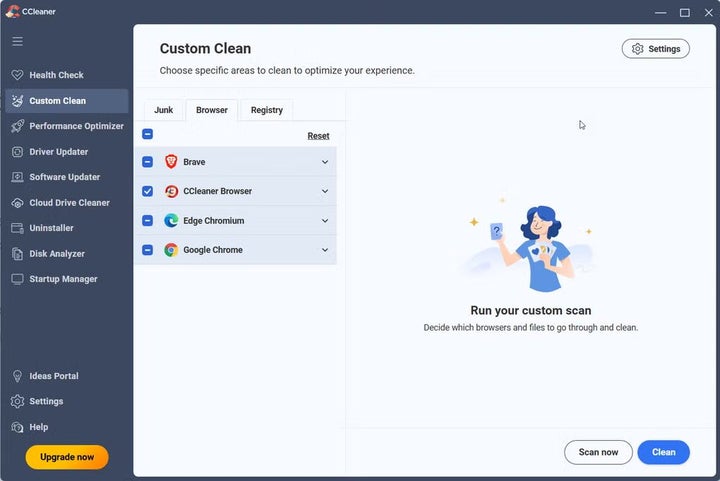
CCleaner Free: Easy smart cleaning for everyone
Developed by Avast, CCleaner Free has established itself as one of the solutions for regaining control and space on our machines. Far from being limited to emptying the recycle bin, the free version includes a set of utilities designed to help to locate where storage capacity is being lost.
1. The duplicate file finder
In its Tools menu, CCleaner Free includes the Duplicate Finder (associated with its disk analysis functions). This tool can help you scan both internal drives (SSD/HDD) and external hard drives and USB flash drives.
Unlike a simple name search, the tool lets you set rigorous matching criteria:
- Exact match: It compares files by name, size, modification date, and actual content to help confirm that detected items are identical matches before offering the option to delete them.
- Exclusion filters: It allows system files or zero-size files to be skipped, helping reduce the risk to system stability.
- Custom search: It’s possible to scan entire drives or select specific folders where you suspect there’s massive data buildup (such as photo albums or project folders). At the end of the scan, the tool presents a clear breakdown of the duplicates found, allowing the user to select and remove unnecessary copies in just a couple of clicks.
2. Cleaning hidden files for optimal performance
Deleting duplicate files usually frees up a lot of space at once, but space optimization doesn’t end there. To help the machine gain space and run faster, CCleaner Free can also help to clean up in areas where Windows builds up junk that’s hard to detect:
- Temporary system files: It can clean error logs, memory dumps, and old installers that remain forgotten after Windows updates.
- Cache and browsing data: It helps remove temporary data from web browsers like Chrome, Edge, or Firefox that slow down startup and browsing.
- Application leftovers: It can locate and remove the residue applications leave behind after closing or after an incomplete uninstall process.
Recover the space that’s already yours
Computer maintenance doesn’t have to be a complex task or require extensive technical knowledge. The buildup of duplicates and unnecessary files is a natural consequence of using any computer over time, but it doesn’t mean you have to live with a slow machine or one with no storage left.
Before considering a financial investment in new hardware, it’s worth auditing your hard drive. With specialized and free tools like Avast’s CCleaner Free, you’ll discover that, most of the time, the solution to your space problems was always there: you just needed to delete the copies you didn’t know you had.
Keep up with Softonic
Get our latest tech news first, wherever you read.
Journalist specialized in technology, entertainment and video games. Writing about what I'm passionate about (gadgets, games and movies) allows me to stay sane and wake up with a smile on my face when the alarm clock goes off. PS: this is not true 100% of the time.
Latest from Chema Carvajal Sarabia
- Make an AI forget its origins? They’ve re-educated this Alibaba AI so it won’t be Chinese
- Google presents Gemini 4 Hydrogen, its fastest AI model that might interest you
- Microsoft is down and you can’t work: this is what we know so far
- Singapore says Megaspeed probe is ongoing: limited help from US and Supermicro
You may also like
- News
Tech layoffs in 2026 update: 206,000 jobs cut worldwide
Read more
 News
Apple Intelligence clears China hurdle: iPad and Mac approved ahead of December rollout
Read more
 News
Grok now says Elon Musk replied to a Nazi account on X
Read more
 News
Samsung Galaxy S27 leaks: Pro and Ultra may dominate the lineup
Read more
 News
Elden Ring: Path of the Cardinal Sin ends with Melina art, not DLC
Read more
 News
Xbox Series X is still worth buying in 2026: 4K power, Game Pass value
Read more