4.7
Astra AI Launcher from DEVORG005 is an Android home-screen replacement that focuses on deadline and reminder management. It converts natural English typed or spoken…
Update: Sep 7, 2026 · 1217 apps reviewed
Application launchers streamline how you open apps, search your device, and jump into common tasks with fewer taps. The best options combine fast indexing, clean layouts, gesture shortcuts, and useful extras such as smart folders, customizable icons, and support for dark mode or theme packs. Some launchers focus on speed and simplicity, while others aim for deep customization and a more polished home screen. Choosing the right one depends on whether you want quicker app access, better organization, or a full visual overhaul that still feels responsive.
Astra AI Launcher from DEVORG005 is an Android home-screen replacement that focuses on deadline and reminder management. It converts natural English typed or spoken…
Choose Softonic on Google and you'll see more of our articles in Top Stories, AI Overviews and AI Mode.
Performance & Stability
Customization Depth
Theme Variety
The big-font layout and desktop contact shortcuts make this launcher stand out for people who want a stripped-down Android setup. It trades deep customization and theme variety for clarity and fast access to the basics, so it suits practical everyday use more than heavy personalization.
Customization Depth
Performance & Stability
Theme Variety
Pie Launcher covers the basics that matter in Launchers & Themes: visual customization, app hiding, and simple launcher-level app controls. It suits Android users who want a quick makeover without a steep learning curve, though the source material points to breadth over advanced launcher depth.
Performance & Stability
Customization Depth
Theme Variety
The radial menu is the clear differentiator here: it cuts mouse travel and keeps frequently used actions close to the cursor. I’d recommend it to power users who value speed and a lightweight launcher over deep automation or heavy customization.
SAO Utils 2 is a versatile Full-Dive 3D app launcher designed for Windows users. It offers a range of customizable themes and desktop widgets,…
1 reviews
Performance & Stability
Theme Variety
Customization Depth
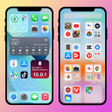
The appeal here is the iOS 14-inspired makeover paired with a solid wallpaper library, including Full HD and some 4K images. It suits Android owners who care more about visual style than deep launcher controls, since the source highlights appearance and wallpaper management more than advanced customization or system-level tweaks.
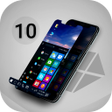
Computer Launcher 10: Win 10 Theme is a popular Android app that allows you to customize your smartphone with a new look and user…
Encrypted RunAs is a small Windows utility designed to let users run applications with alternate credentials—securely and without password exposure. Aimed at IT professionals…