5
9 reviews
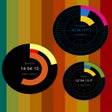
Funny Body Clock is a free program for Windows, belonging to the category 'Utilities & Tools'.
Update: Sep 7, 2026 · 69 apps reviewed
Clock tools for Windows do more than show the current time on your desktop. The strongest options combine world clocks, alarms, timers, stopwatches and reminders in one place, making them useful for remote workers, students and anyone juggling multiple schedules. Good software stays visible without getting in the way, supports time zone changes cleanly and offers enough customization to fit your workflow. The best picks also balance accuracy with convenience, so you can track deadlines, time tasks and keep your day organized without relying on a browser tab or your phone. Explore top picks for Windows.
9 reviews
Funny Body Clock is a free program for Windows, belonging to the category 'Utilities & Tools'.
Choose Softonic on Google and you'll see more of our articles in Top Stories, AI Overviews and AI Mode.
3 reviews
Eusing Clock is a free program for Windows, that belongs to the category 'Personalization'.
Capture & Organization
Sync & Integration
Task & Time Management
yClocky keeps the focus on a visible, customizable desktop clock rather than full planning features. I’d use it as a lightweight time reference on Windows, but it does not add notes, reminders, or task management.
Clockwork (SSE) is a free software for Windows, belonging to the category 'Utilities'.
8 reviews
Task & Time Management
Capture & Organization
Sync & Integration
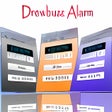
The strongest part of Drewbuzz Alarm is its no-fuss alarm setup for Windows, with custom sounds, snooze control, and background operation that keeps reminders active. It stays narrowly focused on clock-style reminders rather than broader note-taking or planning workflows, so it suits people who want a lightweight alert tool more than a full organizer.
Task & Time Management
Capture & Organization
Sync & Integration
The strongest part of Clock+ is its all-in-one desktop timing setup: alarms, timers, and a live tile keep time visible without leaving Windows. It suits people who want a basic planning aid on the PC, but it stays narrowly focused on timing rather than deeper notes or task management.