Fingerprint Lock Apps for Secure Device Access | 2

Update: Sep 7, 2026 · 168 apps reviewed

Fingerprint lock apps add a fast biometric layer to phones, tablets and some desktop workflows, replacing typed passwords with a touch-based check. The strongest options do more than unlock a screen: they can protect individual apps, secure private files, and restrict access to sensitive settings without making the device cumbersome to use. When choosing one, look for reliable sensor support, low false-reject rates, clear fallback methods and strong privacy handling for stored biometric data. Good tools balance convenience with control, especially for users who want quick access without exposing messages, photos or confidential work apps.

Anthony John Padilla

Anthony John Padilla

Digital Content Writer

Philippines-based writer skilled in editorial, digital, and brand content. Anthony translates complex ideas into clear, structured copy with a strong focus on accuracy and user-centered communication.

Top programs about Fingerprint Lock

  • 4.5

    8 reviews

    Advanced App Security with Multiple Lock Options

    • Lock apps with password, pattern, or fingerprint access
    • Protect specific apps like WhatsApp and Facebook easily
    • Secure photos and documents from unauthorized access
    • Customize lock settings for complete device or app-specific security

    Ideal for

    • Privacy-conscious users
    • Parents managing kids' device access
    • Individuals safeguarding personal documents
    • Usability & Convenience

      6 / 10
    • Feature Breadth

      5 / 10
    • Security Architecture

      4 / 10
    The app excels in providing robust security options for anyone needing to protect personal information, though extensive customization may require some time to set up.
    Anthony John Padilla
  • Choose Softonic on Google and you'll see more of our articles in Top Stories, AI Overviews and AI Mode.

  • 4.8

    35 reviews

    Pop Culture Fingerprint Animations for Your Lock Screen

    • Wide range of fingerprint animations
    • Personalized lock screen designs
    • Pop culture themed animations
    • Easy setup and customization

    Ideal for

    • Anime fans customizing phones
    • Pop culture enthusiasts
    • Users seeking vibrant lock screens
    • Usability & Convenience

      4 / 10
    • Feature Breadth

      3 / 10
    • Security Architecture

      3 / 10
    Fingerprint Live Animation offers a fun way to personalize your lock screen with vibrant and popular animations from pop culture. However, be mindful of the increased battery usage due to the live animations.
    Anthony John Padilla
  • 4.2

    18 reviews

    Secure Your Apps with Fingerprint and Pattern Locks

    • Lock apps using fingerprint for quick access
    • Supports PIN and pattern for enhanced security
    • Customizable lock screen with multiple color options
    • Runs at startup to ensure constant protection

    Ideal for

    • Parents securing apps from children
    • Users avoiding unauthorized data access
    • Frequent travelers needing extra security
    • Usability & Convenience

      7 / 10
    • Feature Breadth

      4 / 10
    • Security Architecture

      4 / 10
    This app provides a robust solution for securing personal data on Android devices. Its combination of fingerprint and pattern locks makes it a flexible choice for users prioritizing privacy.
    Anthony John Padilla
  • 3.8

    4 reviews

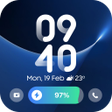
    Lock-screen info panels for an at-a-glance Android setup

    • Customize wallpapers, clock styles, and lock-screen widgets
    • Add animations and effects to personalize the lock screen
    • Show NowBar updates for weather, music, and battery status
    • Surface key info without unlocking the phone

    Ideal for

    • Android personalization fans
    • People checking status at a glance
    • Lock-screen music controllers
    • Security Architecture

      4 / 10
    • Usability & Convenience

      4 / 10
    • Feature Breadth

      3 / 10
    The NowBar is the standout here, putting weather, music, and battery details on the lock screen so you can check them fast. I’d treat this as a personalization tool first and a convenience layer second, since the source focuses on visuals and quick-access info rather than password management or encryption features.
    Anthony John Padilla
  • 4

    8 reviews

    Private media vault with password, fingerprint, or pattern

    • Locks photos, videos, apps, and more behind access controls
    • Supports password, fingerprint, or pattern protection
    • Keeps private media away from unauthorized viewers
    • Does not store passwords or generate account credentials

    Ideal for

    • Phone owners protecting personal albums
    • Fingerprint unlock for quick access
    • Pattern lock for casual privacy
    • Usability & Convenience

      5 / 10
    • Feature Breadth

      3 / 10
    • Security Architecture

      3 / 10
    The app is focused on locking private photos and videos, not managing passwords or securing online accounts. I like the straightforward access options, but anyone expecting password generation, stored credentials, or broader encryption tools will need a different kind of privacy app.
    Anthony John Padilla
  • 3.9

    11 reviews

    Advanced Locking Mechanisms for Enhanced Privacy

    • Remote lock and unlock via SMS
    • Supports pattern and random password unlock
    • Auto-lock for newly installed apps
    • Break-in alerts with photo capture

    Ideal for

    • Privacy-conscious smartphone users
    • Frequent app installers
    • Users needing remote device access
    • Feature Breadth

      5 / 10
    • Usability & Convenience

      5 / 10
    • Security Architecture

      4 / 10
    Smart App Protector offers robust security features ideal for those prioritizing app privacy. While it excels in locking capabilities, occasional crashes and fingerprint issues can be a drawback.
    Anthony John Padilla
  • 4.2

    Fingerprint shortcuts for Android's hidden gestures

    • Enables Pixel-style fingerprint actions on Android 6.0+
    • Works with any fingerprint sensor, not just Google hardware
    • Requires the Google fingerprint service and app permissions
    • Free Android utility for phones and tablets

    Ideal for

    • Android power users on a budget
    • Tablet owners wanting shortcut control
    • No-Google-sensor Android setups
    • Usability & Convenience

      5 / 10
    • Feature Breadth

      3 / 10
    • Security Architecture

      3 / 10
    The appeal here is narrow and practical: it unlocks Google Pixel-style fingerprint actions on Android devices that support the right service. I’d recommend it to people who want a free way to add shortcut behavior to a phone or tablet, but it depends on Android 6.0+, the Google fingerprint service, and the permissions you grant.
    Anthony John Padilla
  • 4.1

    29 reviews

    Customizable Wallpapers with Security Features

    • Set wallpapers for home and lock screens simultaneously
    • Download and share a wide variety of images
    • Use the app offline without any issues
    • Experiences frequent ads that disrupt browsing

    Ideal for

    • Privacy-conscious users
    • Fans of unique wallpaper designs
    • Individuals needing offline access
    • Usability & Convenience

      4 / 10
    • Security Architecture

      3 / 10
    • Feature Breadth

      2 / 10
    While the app offers a diverse range of wallpapers, its frequent ads and poor image quality may deter users looking for a seamless experience.
    Anthony John Padilla
Signed in to Softonic as