4.8
Launcher for Android - Fast, Light & Latest LauncherAre you looking for the best way to personalize your Android phone? Do you want to…
Update: Sep 7, 2026 · 46 apps reviewed
Free Nova Launcher for Android appeals to users who want faster navigation and deeper homescreen control without paying for a premium launcher. It focuses on icon grids, gestures, app drawer organization, dock styling, and smooth performance, making it a strong choice for both minimal setups and highly customized layouts. The best options balance speed, battery efficiency, and flexibility, while avoiding cluttered menus or heavy resource use. When comparing launcher tools, look for gesture support, backup and restore features, icon pack compatibility, and enough visual control to make your phone feel truly personal. Explore top picks for Android.
Launcher for Android - Fast, Light & Latest LauncherAre you looking for the best way to personalize your Android phone? Do you want to…
Get our latest tech news first, wherever you read.
Let gravitational force get into your phone or tablet and make the screen more exciting with the GRAVITY LAUNCHER VS app.This fun and innovative…
1 reviews
Performance & Stability
Customization Depth
Theme Variety
The strongest part of this launcher is its mix of visual customization and practical navigation, from icon packs and widgets to smart search and an app library. I’d rate it highest for people who want to refresh the look of Android without giving up quick access to apps, contacts, and files.
How to apply a theme to your Android device?Download the latest version of the app you use on your phone or tablet, open it,…
1 reviews
Performance & Stability
Customization Depth
Theme Variety
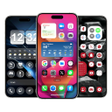
The app’s main draw is its iPhone 13 and iOS 15-inspired makeover, which gives Android devices a very specific visual identity. I’d treat it as a theme-focused launcher with an extra photo editor on the side, not a deep customization tool for power users.
A free, open-source icon pack for Nova Launcher.Nova is one of the best Android launchers available on the Google Play Store, and it's easy…
Launcher for iPhone 14 Pro MaxThis app is the best iPhone 14 Pro Max launcher available in the Google Play Store. It's completely free…
3 reviews
If you're an iPhone user, then you'll be happy to know that we have released a new app for you. It's called iPhone 14…