4.6
T Swipe Gestures is a free Android application designed for smartphone and tablet users who want to improve their device control. It uses an…
Update: Sep 7, 2026 · 248 apps reviewed
Free touch applications help Windows and other systems make better use of touchscreens, stylus input, and gesture-based navigation. The strongest options improve on-screen controls, calibration, palm rejection, and shortcut access without getting in the way of everyday work. When choosing one, look for smooth responsiveness, low resource use, and support for your specific device hardware, especially if you switch between tablet and desktop modes. Good tools also make it easier to manage touch settings, customize gestures, and fix input issues that can slow down a convertible laptop or touchscreen monitor.
T Swipe Gestures is a free Android application designed for smartphone and tablet users who want to improve their device control. It uses an…
Get our latest tech news first, wherever you read.
Phone Tilt Scrolling Gesture is a utility app designed for Android that enables users to scroll through app content simply by tilting their device.…
Touch Assistant - Virtual Key is a utility application designed for Android devices, providing a virtual interface to replace physical buttons. This app offers…
If you’re searching for a new way to handle devices without a touch, Touchless+ might just be the answer. This hands-free app is based…
ProTouch is a free Android application developed by Prowarm, designed to control your electric floor heating system from anywhere. With its user-friendly interface, it…
Auto Clicker - Automatic Touch by Flamingoc Studio is a free app for Android that offers a simple and intuitive interface to automate repetitive…
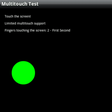
Multitouch Diagnostics is a simple and free Android app developed by Stefan Thomas. This utility app allows users to determine if their phone has…
The iCenter iOS 15 Assistive Touch app is a handy utility that allows you to easily control your smart phone with your fingers. It’s…