Photoshop for Android Apps for Mobile Photo Editing | 4

Update: Sep 7, 2026 · 83 apps reviewed

Photoshop for Android covers mobile editors that bring layer-based retouching, selective adjustments, filters, and AI-assisted cleanup to a phone or tablet. The best options balance precision with touch-friendly controls, so you can crop, remove backgrounds, correct skin tones, or add text without wrestling with a desktop-style interface. Storage use, export quality, and support for high-resolution images matter just as much as effects. The strongest tools are fast, flexible, and easy to use on the go, whether you are polishing social posts, fixing travel shots, or building visuals for work. Explore top picks for Android.

Martin Francis Hernandez

Martin Francis Hernandez

Games & Software Reviewer

Passionate gamer and content writer, Martin specializes in video game reviews and software coverage across commercial, business, and multimedia applications. He helps readers navigate the digital landscape with confidence.

Top programs about Photoshop For Android

  • 4.2

    PSD access on the go for Android photographers

    • Opens Adobe Photoshop PSD files on Android devices
    • Views files stored locally or in the cloud
    • Works as an image, photo, and file viewer
    • Supports latest Android versions

    Ideal for

    • Graphic designers reviewing layouts on mobile
    • Photographers checking client files remotely
    • Cloud-based design handoff on Android
    • Output & Sharing

      4 / 10
    • Editing Toolkit

      3 / 10
    • AI & Automation

      2 / 10
    The app focuses on one job: opening PSD files on an Android phone or tablet without dragging you back to a desktop. It suits photographers and designers who need mobile access to stored work, but it is a viewer-first tool rather than a full editing suite.
    Martin Francis Hernandez
  • Keep up with Softonic

    Get our latest tech news first, wherever you read.

  • 4.5

    123 reviews

    Brush-heavy editing with layered canvas control

    • Hundreds of brushes from popular companies
    • Dozens of textures and materials for added depth
    • Work on multiple canvases at once
    • Export artwork to a variety of formats

    Ideal for

    • Illustrators on iPhone or iPad
    • Mixed-media artwork projects
    • Exporting to multiple file formats
    • Editing Toolkit

      5 / 10
    • Output & Sharing

      4 / 10
    • AI & Automation

      3 / 10
    The editor leans hard into brush variety and layered creative work, so it stands out for mobile artists who want more than a basic photo touch-up tool. Its biggest limitation is that the source material focuses on drawing and design rather than classic photo retouching, so it fits best when editing overlaps with illustration.
    Martin Francis Hernandez
  • 4.5

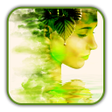
    Double-exposure edits in a few taps

    • Blend two or more photos into one multi-exposure image
    • Create a double-exposure effect in seconds
    • Select pictures first, then mix them with built-in tools
    • Keep the workflow simple for fast Android photo edits

    Ideal for

    • Android creators on a tight deadline
    • Art students building portfolio pieces
    • Phone edits without a desktop editor
    • Editing Toolkit

      5 / 10
    • Output & Sharing

      4 / 10
    • AI & Automation

      3 / 10
    The tool focuses on one thing: turning separate photos into a layered multi-exposure image without opening a heavy editor. I like it for quick Android experiments, but the trade-off is clear — this is a narrow editor built for blending, not a full photo retouching suite.
    Martin Francis Hernandez
  • 4.9

    AI-style polish with hands-on photo retouching

    • Crop, frame, and refine shots for cleaner compositions
    • Adjust brightness, contrast, and saturation precisely
    • Blur and focus tools add depth to portraits and scenes
    • Background remover creates clean cutouts for composites

    Ideal for

    • Android photo editors
    • Portrait touch-ups on mobile
    • Cutouts for shareable graphics
    • Editing Toolkit

      7 / 10
    • AI & Automation

      5 / 10
    • Output & Sharing

      5 / 10
    MiraPix gives Android photo editors a solid mix of core adjustments and creative extras, from precise color tuning to blur, focus, stickers, text, and background removal. I’d rate it best for quick, polished edits and simple cutouts, though the source doesn’t point to advanced layer-based workflows or export controls.
    Martin Francis Hernandez
  • 4.1

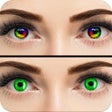
    JPEG eye edits for simple photo touch-ups

    • Change eye color on JPEG photos
    • Edit photos locally on your Android device
    • Targeted retouching for a specific facial detail
    • Free app from Body Works Fitness Group

    Ideal for

    • Android selfie editors
    • JPEG portrait touch-ups
    • Free facial detail edits
    • Editing Toolkit

      4 / 10
    • Output & Sharing

      4 / 10
    • AI & Automation

      3 / 10
    The tool focuses on one narrow job: changing eye color in JPEG photos on Android. That makes it useful for a quick cosmetic tweak, but it is not a broader photo editor with a full adjustment toolkit or export options.
    Martin Francis Hernandez
  • 4.2

    Open PSD and EPS files on the go

    • View PSD files on Android without desktop software
    • Open EPS artwork locally, even without internet
    • Convert PSD or EPS files to PNG photos
    • Share PSD and EPS files directly from the app

    Ideal for

    • Android artwork review on the move
    • Offline proofing for client handoffs
    • PNG-ready asset conversion
    • Output & Sharing

      4 / 10
    • Editing Toolkit

      3 / 10
    • AI & Automation

      2 / 10
    The tool keeps PSD and EPS files accessible on a phone without the overhead of Photoshop or Illustrator, and the offline mode is a real plus for travel or spot checks. I’d still treat it as a lightweight viewer and converter rather than a full photo editor, since the source only supports basic viewing, PNG export, and sharing.
    Martin Francis Hernandez
  • 4.2

    Precise photo edits with room for creative effects

    • Enhance images with precise detail adjustments
    • Apply artistic effects to shift the photo style
    • Refine natural tones or push bold color looks
    • Edit from a free Android app built for photos

    Ideal for

    • Android photographers
    • Natural-tone retouching
    • Bold style experiments
    • Editing Toolkit

      6 / 10
    • AI & Automation

      5 / 10
    • Output & Sharing

      5 / 10
    PixelCraft Studio focuses on the core photo-editing job: tightening details, shaping tones, and adding stylized effects without feeling limited to one look. I’d recommend it for Android shooters who want a free editor that can handle both subtle refinements and more expressive image treatments.
    Martin Francis Hernandez
  • 4.2

    Photoshop shortcuts organized for faster editing workflows

    • Groups Photoshop keyboard shortcuts into clear categories
    • Lets you recall commands with a single key press
    • Covers the most useful shortcuts for quicker edits
    • Helps you work through projects with less repetition

    Ideal for

    • Photoshop learners building muscle memory
    • Designers speeding up repetitive tasks
    • Android reference for desktop editing workflows
    • Output & Sharing

      4 / 10
    • Editing Toolkit

      3 / 10
    • AI & Automation

      2 / 10
    The tool focuses on memorizing Photoshop shortcuts instead of editing images directly, so it works as a reference companion rather than a full photo editor. I like it for designers and students who want faster keyboard-driven workflows, but it has no actual adjustment, retouching, or export tools.
    Martin Francis Hernandez
Signed in to Softonic as