4.3
GOODWILL is a free Android application developed by chengqikai, which falls under the Lifestyle category. This app is designed to assist craftsmen in obtaining…
Update: Sep 7, 2026 · 1360 apps reviewed
Android widget apps turn a home screen into a live dashboard, putting clocks, calendars, weather, music controls and system stats within a single swipe. The best options balance useful information with clean design, so your screen stays readable instead of cluttered. Look for apps that offer flexible sizing, fast refresh rates, strong battery efficiency and enough styling control to match your wallpaper or icon pack. Some focus on practical glanceable data, while others lean into visual customization with custom fonts, shapes and transparent layouts. Explore top picks for Android.
GOODWILL is a free Android application developed by chengqikai, which falls under the Lifestyle category. This app is designed to assist craftsmen in obtaining…
Get our latest tech news first, wherever you read.
Winnipeg - Know Your Zone is a free Android app developed by the City of Winnipeg. It helps residents of Winnipeg, Canada, to find…
Visual Customization
System Impact
Widget Variety
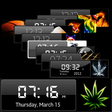
The strongest part here is the mix of visual control and practical extras: you can match the widget to your wallpaper, then add weather, battery, and quick app shortcuts. It does ask you to accept a paid ad-free upgrade if you want the cleanest experience, but the widget variety and customization depth are solid for a personalization app.
Bluetooth Connect Widget is a free Android homescreen widget designed to enhance user experience with Bluetooth connectivity. This utility tool allows users to quickly…
Visual Customization
System Impact
Widget Variety
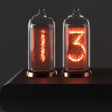
The standout here is the nixie-inspired look, backed by basic but useful widget controls for time, date, alarm, and color tweaking. It suits Android users who want a decorative clock that fits different screen sizes, though it stays focused on one widget type rather than offering a broader customization toolkit.
System Impact
Visual Customization
Widget Variety
The strength here is system-level badge accuracy: it keeps Samsung app icons aligned with unread notifications and clears counts when alerts are dismissed. I’d keep it enabled on Galaxy phones, since disabling it breaks unread badges entirely and any stopped-state issue usually needs a cache reset and reboot.
TapNow is a social app for friends that lets you easily share photos and communicate through emojis. You can share your photos with your…
RaceWeek: Formula Widgets, developed by Philip Kuklis, is a compact Android companion that places race weekend information directly on the home screen. It supplies…