

VPNs, or virtual private networks, make sure that businesses can securely connect their employees, offices, and cloud resources by creating encrypted tunnels between endpoints. The two primary types of VPNs are defined by what they connect:
- A site-to-site VPN connects one network to another.
- A remote access VPN connects individual devices to a network.
But choosing the right VPN means so much more than selecting the right connection type. Protocols, which are the rules for data transmission, deployment models, like on-premises or cloud-delivered, and network topologies will all impact speed, control, and security. For example, a lightweight protocol like WireGuard can help improve speed, but your results will also depend on your infrastructure and how close your VPN servers are to your users.
In this article, we explore the different types of VPNs and how they function so that you can make informed decisions about the best configuration for your business.
Types of VPNs for Connecting Networks and Devices
VPNs have two different categories: site-to-site and remote access. The type of connection you choose will set the foundation for what you secure, whether it’s networks or individual devices. Most modern business VPN providers aren’t limited to just one VPN category. For example, NordLayer can provide remote access for employees, a site-to-site VPN tunnel for branch offices, and layer Zero Trust policies for fine-grained access control.
In the chart below, we break down the most common types of VPNs and subtypes within each.
|
VPN Type |
Connection Type |
Best For |
Subtypes |
Common Protocols |
|
Site-to-site |
Network to network |
Multiple office branches or business networks |
Intranet, extranet |
Primarily IPsec/IKEv2 |
|
Remote access |
Device to network |
Remote workers and contractors |
Client-based, clientless |
OpenVPN, WireGuard, IPsec/IKEv2, SSTP |
Site-to-Site VPNs: Secure Network-to-Network Connections
Best for: Businesses with multiple offices or data centers
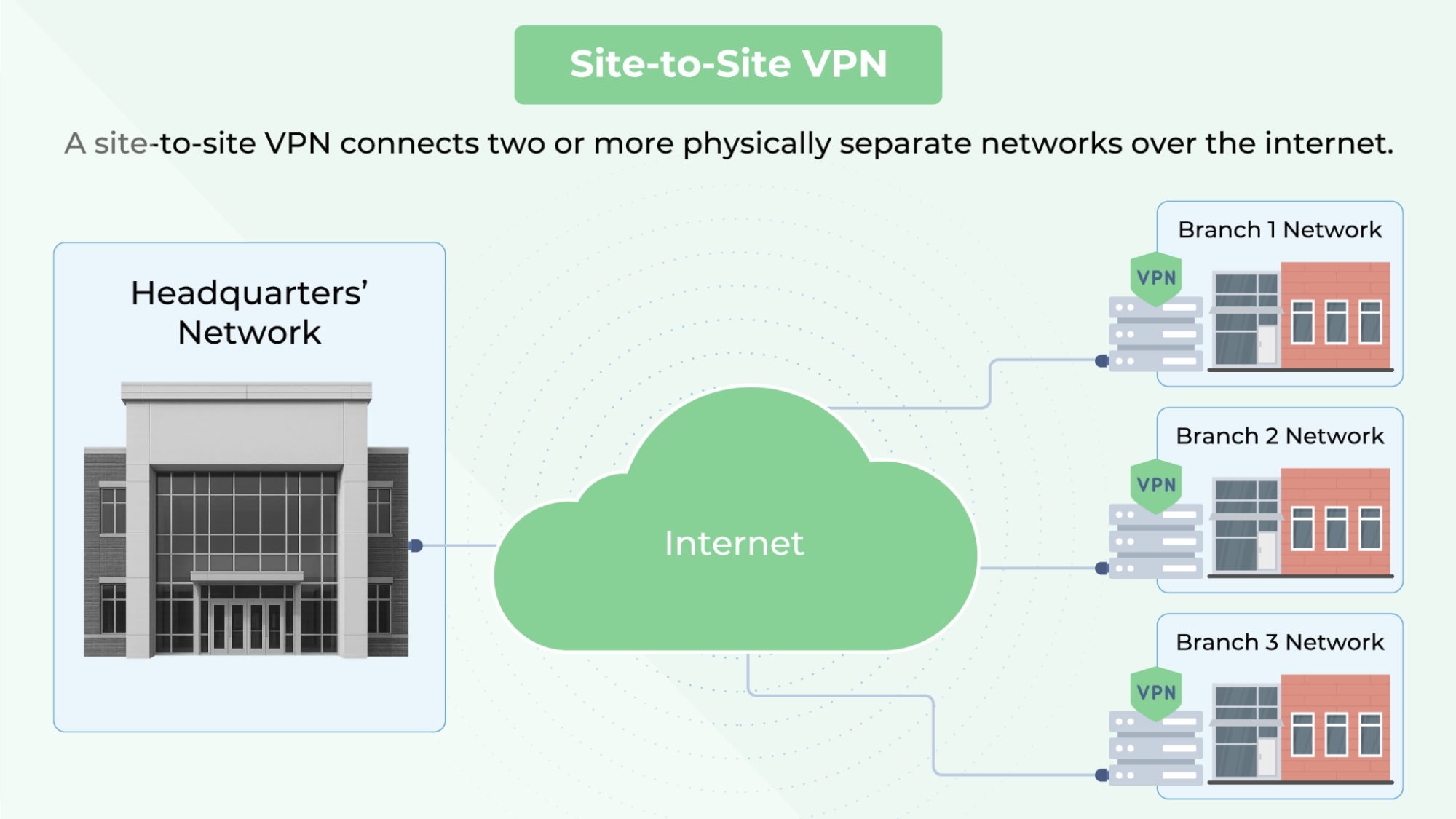
Site-to-site VPNs are used to connect two or more physically separate networks over the internet, establishing encrypted tunnels between routers or firewalls at different sites. Using a hub-and-spoke model, these VPNs are a good choice for organizations that have varied locations with the need for secure, always-on communication between networks.
These VPNs commonly use the internet protocol security (IPsec) suite, with internet key exchange version 2 (IKEv2) managing key exchange and tunnel setup. The type of deployment falls into two categories: intranet-based (internal sites) and extranet-based (cross-organizational).
Intranet-Based VPN
What it does: An intranet-based VPN creates encrypted tunnels that connect multiple internal local-area networks (LANs), such as headquarters, branch offices, and data centers, to form a wide area network (WAN).
How it Works: Each LAN uses a VPN-capable router or firewall to run an IPsec tunnel. Traffic between sites is encrypted/decrypted at the network edge.
Use cases
- Securely connecting branch offices to share resources
- Integrating multiple data centers for backup and disaster recovery
- Centralizing network management
- Supporting regulatory compliance with encrypted interoffice traffic
Extranet-Based VPN
What it does: An extranet-based VPN establishes secure, encrypted connections between an organization’s internal network and external partner networks (such as suppliers, vendors, or business partners), enabling controlled access to specific resources without exposing the entire internal network.
How it works: A VPN gateway (router or firewall) at each organization establishes an IPSec tunnel between networks. Access is restricted to only the resources or applications necessary for the external party, using firewall rules, network segmentation, and authentication controls.
Use cases:
- Enabling long-term B2B integrations between logistics partners or vendors
- Encrypting sensitive e-commerce data exchanges between platforms or fulfillment services
- Allowing selective resource access, such as order systems or dashboards
Remote Access VPNs: Secure Device-to-Network Connections
Best for: Distributed teams, remote workers, and contractors
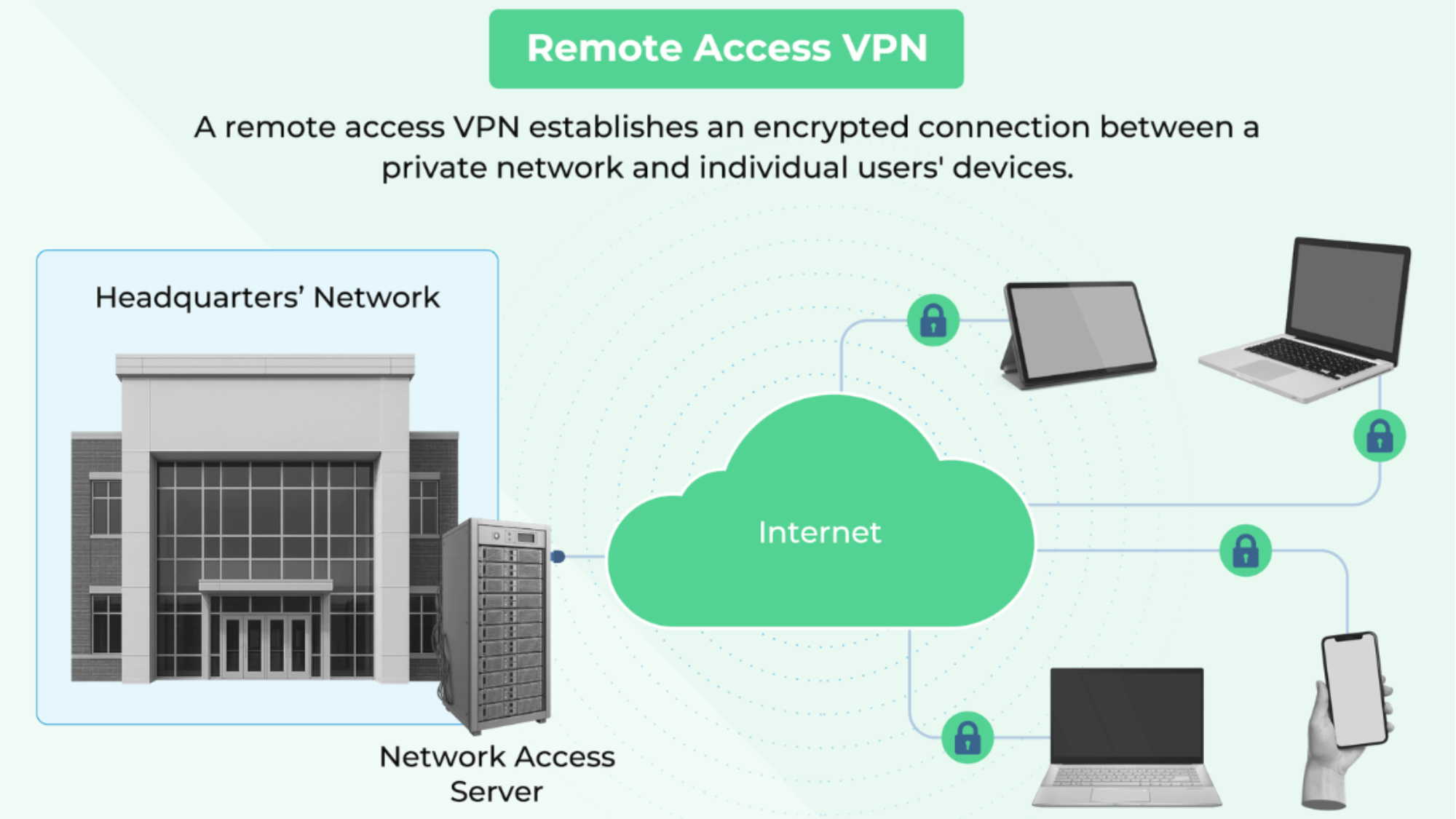
Remote access VPNs will establish encrypted tunnels between devices and your network via a web browser of client software. These VPNs are essential if your business has remote or hybrid teams, since they allow users to access company resources from anywhere while maintaining security. Popular protocols used with these VPNs include OpenVPN, WireGuard, IKEv2, and SSTP, but keep in mind that each has trade-offs around speed, encryption, firewall traversal, and deployment complexity. The overall performance of remote access VPNs will depend on infrastructure factors like the provider’s PoP distribution and endpoint configuration.
Client-Based VPN
What it does: Client-based VPNs create a secure connection between a user’s device and a corporate network by using client software. This enables remote employees, contractors, or mobile users to access internal resources as if they were physically on site.
How it works: The user launches the client software on their device, which initiates an authentication process, often involving multi-factor authentication (MFA) or single sign-on (SSO) through integrations with identity providers. Once authenticated, the client establishes a secure tunnel to a VPN server on the corporate network. All encrypted data travels through the VPN tunnel, protecting it from interception over untrusted networks.
Some modern tools like Tailscale use a mesh topology, allowing devices to connect to each other directly without relying on a central VPN server. This can reduce latency and simplify access to distributed resources, especially in developer environments.
Use cases
- Allowing staff or contractors to safely connect to the corporate network from home, hotels, or public Wi-Fi
Clientless VPN
What it does: A clientless VPN allows users to access internal web applications via a browser portal without installing VPN software. Clientless VPNs are ideal for accessing web-based apps, but they typically don’t support access to non-browser-based resources like shared drives or internal APIs.
How they work: Clientless VPNs use secure sockets layer (SSL) or transport layer security (TLS) protocols to encrypt web-based traffic through browser sessions. When a user connects, the VPN gateway acts as a reverse proxy, authenticating the user and presenting a web-based portal with links to authorized internal resources.
Use cases:
- Enabling secure, browser-based access for contractors, partners, or BYOD users
- Providing quick, limited access for ad-hoc or temporary users
Both site-to-site and remote access VPNs can be deployed using different hosting models, which include on-premises, cloud-delivered, or hybrid. The deployment method you use will impact how the VPN is configured, managed, and scaled.
VPN Deployment Models: Weighing Control and Scalability
You can categorize VPNs based on how they connect, but their deployment model also plays a major role when it comes to finding the right fit for your company. Choosing the right VPN deployment model depends on how much infrastructure you want to manage, where your users and resources are located, and how much control or customization you need.
Understanding these three major deployment architectures will help you match the right VPN setup to your infrastructure.
|
Deployment Model |
Setup Time |
Management Level |
Best Fit |
|
On-premises |
Long |
High |
Enterprises with strict security or compliance requirements |
|
Cloud-delivered |
Short |
Low |
Remote or hybrid teams; organizations seeking rapid deployment and scalability |
|
Hybrid |
Medium |
Medium |
Organizations needing to securely connect on-premises and cloud resources; those with mixed legacy and cloud workloads |
The deployment model determines how your VPN is hosted, not what type of connection it supports. For example, you can deploy both remote access and site-to-site VPNs using on-prem infrastructure, via cloud gateways, or through hybrid configurations.
On-Premise VPN
On-premise VPNs are hosted and managed within your organization’s infrastructure. You control the software, hardware, and all routing, authentication, and encryption policies. They do have a higher initial setup cost and need internal expertise, but they ultimately give you more control.
When to use:
- You operate primarily in data centers or local networks.
- You need full control for compliance.
- Your VPN traffic should never leave your network perimeter.
Cloud-Delivered VPN
Unlike on-premise VPNs, cloud-delivered VPNs are hosted and managed by a third-party provider. Your users connect through the vendor’s global points of presence or PoPs, and the vendor handles encryption, authentication, traffic routing, and performance optimization. While cloud-delivered VPNs are much easier to set up and offer some performance advantages thanks to the vendor’s global infrastructure, they may come with less customization and control compared to self-hosted or open-source deployments.
When to use:
- You have a distributed workforce or a hybrid team.
- You don’t want to manage infrastructure.
- You need a fast, scalable deployment with centralized controls.
Hybrid VPNs
Hybrid VPNs connect on-premises infrastructure and cloud environments using secure tunnels. They offer the control and reliability of traditional on-prem VPNs, along with the scalability and flexibility of cloud-based solutions.
Enterprises often use hybrid VPNs when they have legacy systems that can't be moved to the cloud but still need to support remote workers. They’re also useful for organizations operating in hybrid or multi-cloud environments that need consistent security policies across both.
When to use:
- Your apps and resources are split between on-prem servers and the cloud.
- You need consistent access and policy enforcement across both environments.
- You’re in transition from traditional infrastructure to cloud-native workflows.

Common VPN Protocols: Performance, Security, and Compatibility Tradeoffs
A VPN protocol is a set of rules that determine how data is encrypted, authenticated, and transmitted between your device and the VPN server. The protocol you choose will determine the speed and security of your network, as well as the ability to bypass network restrictions. Each protocol listed here is designed with different strengths and trade-offs.
- OpenVPN is a popular open-source protocol that offers strong encryption and significant customization options via the OpenSSL library. It works over both TCP and UDP, making it useful for bypassing firewalls, and is a good choice for deployments where both flexibility and security are priorities.
- WireGuard is a modern, high-speed protocol designed for performance and simplicity. It uses modern cryptographic algorithms like ChaCha20 for encryption and Poly1305 for authentication, optimizing both speed and security.
- IKEv2/IPsec is a stable, secure protocol pairing that is well-suited for mobile devices and site-to-site tunnels. It offers automatic reconnection when switching networks and is built into most major operating systems.
- SSTP is a Windows-native protocol that uses SSL/TLS to tunnel traffic over port 443, helping it bypass strict firewalls. While SSTP is natively supported on Microsoft Windows, it can be used on other platforms with third-party tools, though support may be inconsistent.
- L2TP/IPsec is a legacy protocol that adds IPsec encryption to layer 2 tunneling protocol (L2TP) tunnels. It’s supported on many devices but is slower due to double encapsulation and is generally considered outdated. It should only be used with older systems that can't support modern alternatives.
How to Choose and Configure the Right VPN for Your Business
Selecting the right VPN isn’t just about picking a provider or configuration. It’s about understanding how connection type, deployment model, and protocol will shape your performance, security, and control. Follow the steps below to choose and configure the right VPN for your company.
- Identify what you need to connect.
-
- Site-to-site: Branch offices or cloud networks connect
- Remote users: Remote users to internal resources
- Hybrid model or ZTNA: Multiple types of users, apps, and networks
- Evaluate your deployment model.
-
- On-prem: Full control and customization required
- Cloud-delivered: Ease of use and fast rollout
- Hybrid: Bridging legacy infrastructure with cloud apps
- Match protocols to your priorities.
-
- OpenVPN or IKEv2/IPsec: Security and flexibility
- WireGuard: Speed and simplicity
- SSTP: Windows ecosystem
- L2TP/IPsec: Legacy support
- Choose the right topology.
-
- Hub-and-spoke: Centralized control
-
- Mesh: Peer-to-peer, lightweight access
- Layer on access controls.
- Add device-level segmentation, posture checks, or app-specific access with identity providers and access control policies.
When to Move Beyond VPNs
While VPNs are great to secure data access, their limitations have become more obvious as organizations move to cloud-first, distributed, and hybrid work models. Traditional VPNs often grant users broad network access, increasing the risk of lateral movement in the event of compromised credentials while struggling to enforce granular, application-level security policies. You might also face some performance issues like latency and bandwidth constraints, especially when connecting global users or accessing cloud-based applications.
As a result, many companies are working to adopt modern alternatives like Zero Trust Network Access (ZTNA), which shifts access control from the network layer to the user and application level. ZTNA works by continuously verifying user identity and device posture, only granting access to specific applications and not the entire network. This helps reduce the attack surface and improves compliance. If your business requires more granular access controls, seamless cloud integration, or needs to support a rapidly scaling remote workforce, it may be time to move beyond traditional VPNs to solutions like ZTNA, SASE, or SDP. These VPN solutions are designed to meet the demands of today’s dynamic and distributed environments.
Modern VPN alternatives include:
- ZTNA: This solution includes identity- and context-based access, continuous verification, and granular policy enforcement.
- SASE: This solution combines ZTNA, secure web gateways, and other cloud-delivered security services for comprehensive protection.
Providers to Consider
With more businesses needing secure access to cloud, on-premises, and hybrid resources, service providers now offer more than just traditional VPN tunnels. Most top solutions blend VPN, Zero Trust Network Access (ZTNA), and advanced access controls, which deliver granular, identity-aware security and seamless remote connectivity. Here are some of the most highly regarded providers.
|
Provider |
Best for |
Key Features |
|
NordLayer |
Small and mid-sized businesses that are transitioning from legacy VPNs and want an easy-to-deploy solution |
Offers VPN + ZTNA hybrid, plus threat detection and response capabilities, and browser-level deployment options |
|
Tailscale |
Teams needing a fast mesh VPN and peer-to-peer access |
Built on WireGuard; extremely easy to deploy |
|
Twingate |
Cloud-native teams and organizations seeking lightweight ZTNA with minimal infrastructure overhead |
Application-specific access, identity-based policies, and rapid setup without opening firewall ports |
|
Cloudflare Access |
Organizations seeking identity-aware access to internal apps without relying on traditional VPN tunnels |
Agentless, browser-based ZTNA integrates with all major IdPs; leverages Cloudflare’s global edge network |
|
Harmony SASE (Perimeter 81) |
Mid-sized organizations that need centralized management and more advanced security features |
Integrates a VPN, ZTNA, SWG, FWaaS, and advanced threat protection into a single platform |
What option to choose?


.jpg)

Future-Proof Your Business with Secure Remote Access Solutions
Choosing the right type of VPN service or secure remote access solution is essential to protect your data. Traditional VPNs remain the backbone of connectivity protection, but modern business solutions may require an advanced solution like ZTNA or SASE. By keeping your connectivity requirements, security posture, and future scalability in mind, you can select a secure VPN that’s the best VPN for you and your business.