
News
Unleash Your Vocal Identity: Apple Debuts Live Speech and Personal Voice Recreations
Apple announces new accessibility features coming later this year

- May 17, 2023
- Updated: July 2, 2025 at 2:11 AM
Apple has always been a brand very committed to accessibility in its devices. Now, the company has introduced new options for World Accessibility Awareness Day. These will also be part of iOS 17, the new update the iPhone will see later this year.

It was Tim Cook himself who shared on Twitter the new accessibility options. However, there are two that have particularly caught the attention of users, the so-called Live Speech and Personal Voice. On the one hand, thanks to Live Speech we can type a text and have our device read it aloud for us. However, Personal Voice is shown as a way for people to “save their voice” in a synthesized form.
Thanks to Personal Voice, the iPhone will be able to imitate our voice and speak for us. Apple explains that it is designed for those at risk of losing the ability to speak, such as those diagnosed with ALS. This feature integrates with Live Speech and they work together.
To do this on your iPhone or iPad, you’ll just have to read aloud random phrases that would be indicated on your device’s screen for 15 minutes. So no, you won’t be able to imitate the voices of your favorite celebrities (for now). With Live Speech and Personal Voice, users will be able to type what they want to say out loud during phone calls, via FaceTime or even in person.

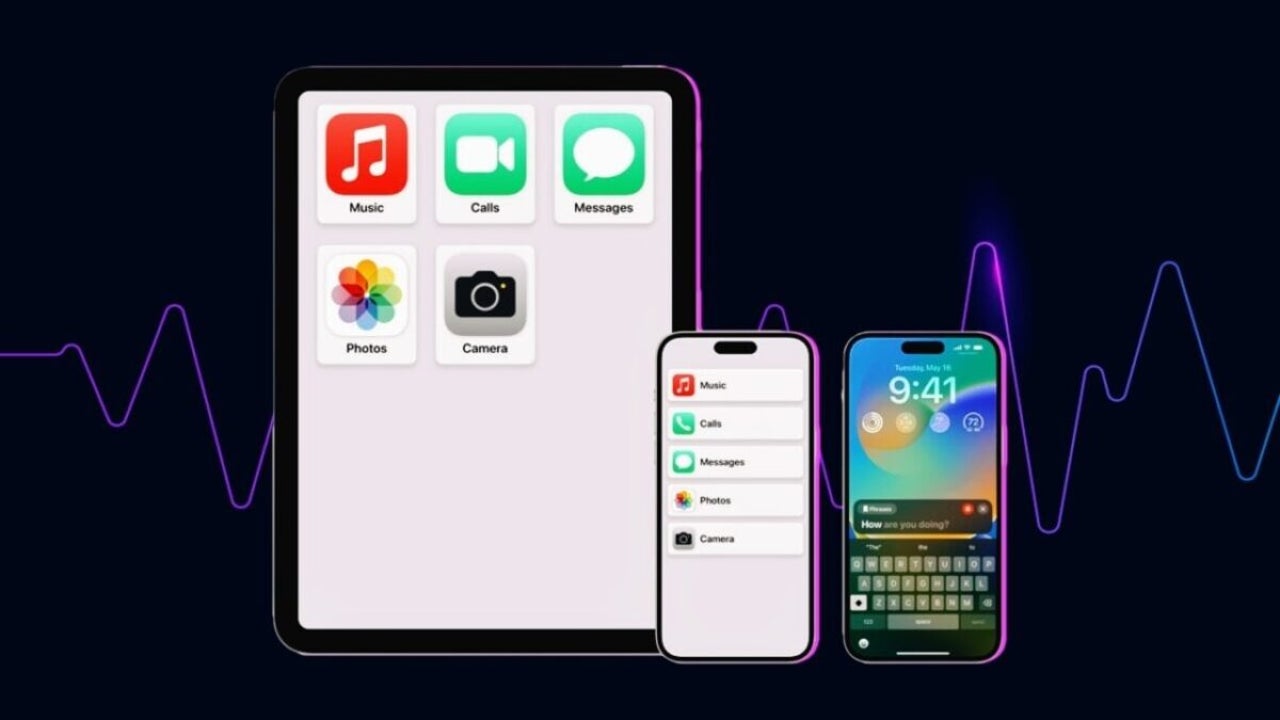
However, the new accessibility features are not limited to synthesized voices. Another new feature announced is Assistive Access, which simplifies the iOS interface as much as possible. This is especially useful for the elderly or those who have difficulty navigating their devices.

We will also find improvements in the Magnifier and its object recognition function, we will be able to enlarge the font in macOS applications, there will be integration with external hearing aids and much more. With its pluses and minuses, it is always nice to see that there is a greater commitment to accessibility for those who need it most.
Some of the links added in the article are part of affiliate campaigns and may represent benefits for Softonic.
Choose Softonic on Google and you'll see more of our articles in Top Stories, AI Overviews and AI Mode.
Artist by vocation and technology lover. I have liked to tinker with all kinds of gadgets for as long as I can remember.
Latest from María López
- How to get the most out of Adobe Firefly’s free daily generations
- Adobe Firefly vs generic AI image tools: which fits real brand workflows better?
- How to turn raw clips and long videos into social-ready content with Adobe Firefly video editor
- How to use reference images, video, and voice in Adobe Firefly to generate more consistent concept scenes
You may also like
 News
Bit Reactor hit by new layoffs: Star Wars Zero Company studio cuts staff again
Read more
 News
Ocarina of Time remake datamine sparks fresh Master Quest DLC rumors
Read more
 News
GTA 6 leak points to 120Hz console support: 60 FPS still looks unlikely
Read more
 News
Nvidia hires crisis PR specialist: Jensen Huang controversy widens
Read more
 News
Android Auto drops older phones: Android 11 is now required
Read more
 News
The Take gets first look from Netflix: Washington and Pattinson revealed
Read more