
News
Malware scams popping up in OpenDocuments

- July 19, 2022
- Updated: July 2, 2025 at 3:34 AM
OpenOffice is a great free alternative to Microsoft 365 and Google Workspace. It is a fully featured productivity suite of programs complete with a word processor, spreadsheet app, database program and more. Furthermore, you can download the apps, so you don’t even need access to the internet to work them. The OpenDocument format is kind of like OpenOffice’s file format, but as you’d imagine from the name it has been built to work across a variety of different programs. This broad compatibility, however, has attracted scammers as today we are here today to warn you about a new malware scam found in infected OpenDocuments.

HP’s in-house threat research team, HP Wolf Security has announced that they have been tracking a phishing scam involving OpenDocument text files since June.
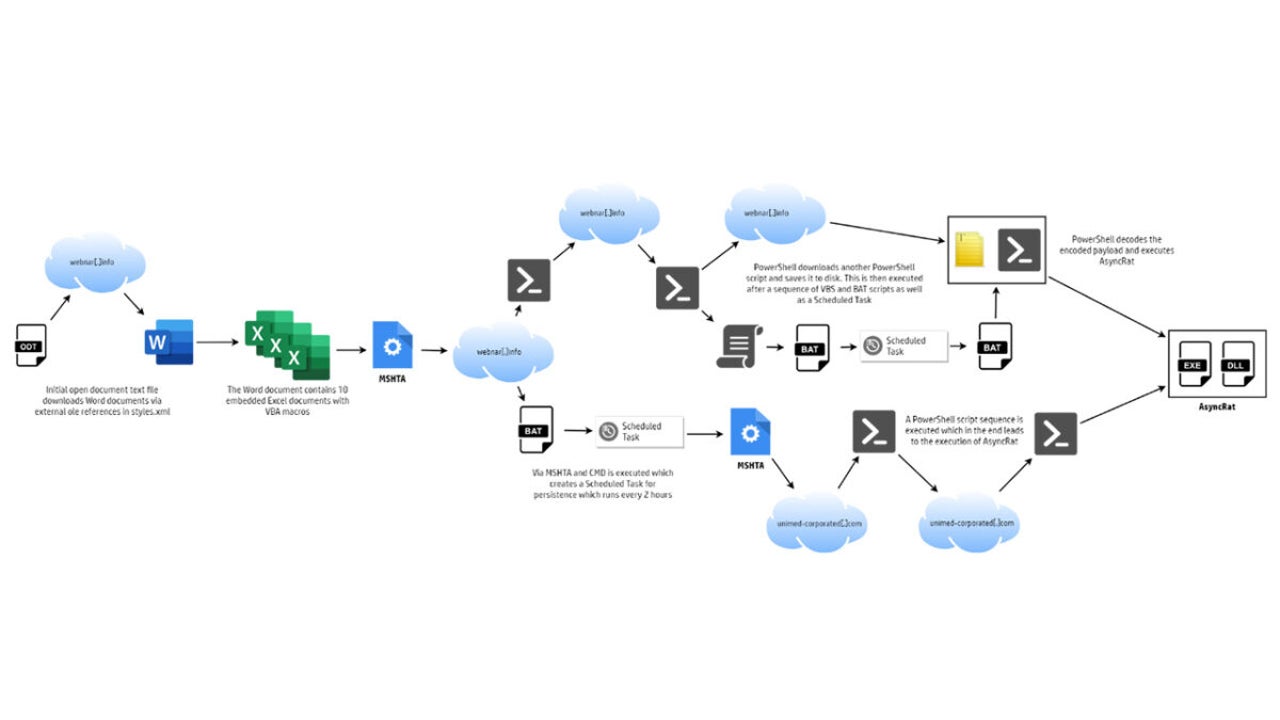
The scammers have been distributing these infected files, disguised guest registration documents, to a series of hotels in Latin America. According to HP Wolf Security, when the victims open these files, they are prompted with a message to update fields from other files and clicking to confirm this cryptic message opens up an Excel file.
From there, the user is asked to activate macros, and when they do that, the trouble really starts. Macros have long been a security vulnerability in Excel, so much so that Microsoft has moved to disable them recently in a bid to close it off. Antivirus programs usually catch infected Macros, but this isn’t the case inside of OpenDocuments. HP Wolf Security says:
“Unlike many malicious documents, analyzing the OpenDocument file reveals no hidden macros. However, the document references Object Linking and Embedding (OLE) objects hosted remotely, as shown in the styles.xml file. The document references 20 documents hosted on the same domain, webnar[.]info.”
It is unusual for hackers to use OpenDocuments in this way, but it does seemingly offer clear advantages to their cause. Once the victim as activated the Macros, they get infected with AsyncRAT, a remote access trojan malware. The analysts go to say:
“Documents that arrive from outside an organization should always be treated with suspicion, especially if they try to load external content from the web – but in practice this isn’t always straightforward advice to follow, especially in industries that rely on exchanging electronic documents between suppliers and clients.”
This may be difficult in practice for hoteliers or other public-facing companies to follow, but if you are running a hotel reservations department, you could do worse than printing off a copy of our anti-phishing infographic and putting it up in your office.
Image via: HP Threat Research
Choose Softonic on Google and you'll see more of our articles in Top Stories, AI Overviews and AI Mode.
Patrick Devaney is a news reporter for Softonic, keeping readers up to date on everything affecting their favorite apps and programs. His beat includes social media apps and sites like Facebook, Instagram, Reddit, Twitter, YouTube, and Snapchat. Patrick also covers antivirus and security issues, web browsers, the full Google suite of apps and programs, and operating systems like Windows, iOS, and Android.
Latest from Patrick Devaney
You may also like
 News
Rockstar heads into UK union vote: GTA 6 launches midway
Read more
 News
The Legend of Zelda: Ocarina of Time remake is out now: why Switch 2 was needed
Read more
 News
Without James Gunn at DC, what happens to Superman, Batman, Wonder Woman, and the rest of the heroes?
Read more
 News
Nintendo will add a much-requested option for Switch and Switch 2 very soon
Read more
 News
School buses now use AI ticket cameras: 30 states allow automated enforcement by 2026
Read more
 News
Dragon Age 4: former BioWare lead reveals the 2016 “Joplin” pitch
Read more