
News
Twitter for Android finally gets the feature everybody wants

- January 22, 2019
- Updated: July 2, 2025 at 5:29 AM
Twitter truly is an enigma. It has opened up a direct line to journalists, allowing users to get their news quicker and direct from the source. It has also, however, enabled peddlers of fake news to bring their lies to a wider, global audience. Accordingly, both dictatorships and democracies are rocking thanks to the Twitter effect. Twitter is a controversial beast.

Like with many of the new big tech goliaths, however, one of the most controversial Twitter issues is an internal matter rather than an external effect. The infernal Twitter algorithm has caused plenty of angst among its user base and one matter in particular reigns supreme as the most annoying. Twitter’s timeline serves up tweets the network thinks you might find are important or that you’ve missed rather than the Tweets people have just posted. Why? Why? WHY!?!
Fortunately, this has finally changed.
Twitter for Android now has a chronological timeline button
You can now have the most recent tweets from the people you follow show first on your Twitter timeline. Infuriatingly for Android users, the iOS version of the app has had a chronological timeline button since before Christmas. The feature dropped over there on December 18, but we’re very happy to tell you that now Android users have the button, too. This means that, unless you’re a part of the rare breed that still uses a Windows phone, you’ll now have access to the Chronological timeline button.
Android, we got you. Starting today, tap ✨ to switch between latest and top Tweets. pic.twitter.com/7rXo3BNEJ6
— Twitter (@Twitter) January 15, 2019
This move sets Twitter apart from other social networks, which force users to see the posts they think they’ll like the most. This has been possible for a while on Twitter but, until now, users had to delve into the often-confusing Twitter Settings menus to make it happen. Now it is easier than ever to see Tweets as they’re being posted.
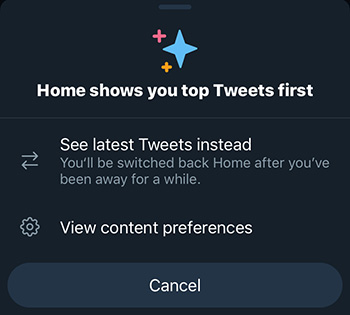
Now all Android and iPhone users have to do to have the latest Tweets show first on their timeline is click on the star button found in the top-right corner of the app. If you can’t see the button when you open the app, simply scroll up towards the top of the feed and the button will appear. Tapping it will give you the option to See latest Tweets instead and hitting that option will change your timeline to chronological view. You might find once you’ve selected it, that you’re a couple of days down your timeline but hitting the Home button will take you to the top of your feed.
This feature still isn’t available on desktop, but according to the Tweets sent out announcing the new feature, there is no reason to believe the change won’t be across all of Twitter rather than simply on the mobile apps.
Patrick Devaney is a news reporter for Softonic, keeping readers up to date on everything affecting their favorite apps and programs. His beat includes social media apps and sites like Facebook, Instagram, Reddit, Twitter, YouTube, and Snapchat. Patrick also covers antivirus and security issues, web browsers, the full Google suite of apps and programs, and operating systems like Windows, iOS, and Android.
Latest from Patrick Devaney
You may also like
 News
NewsTikTok’s Bold Move: The Joint Venture That Changes Everything for American Users
Read more
 News
NewsThis documentary teaches us in a very original way how Disneyland was built
Read more
 News
NewsThe mod to make The Sims 4 able to have sex is downloaded up to 400,000 times a day
Read more
 News
NewsBack to the Future only moved forward thanks to the casting of this legendary actor
Read more
 News
NewsThis weekend you can play for free the latest game from the creators of Alan Wake
Read more
 News
NewsThe most successful Action RPG of recent years will be available to play for free this weekend
Read more