
How To
Android 4.4 KitKat: How to install the update

- October 21, 2013
- Updated: July 2, 2025 at 8:05 AM
Do you want to know how to install Android 4.4 KitKat on your phone or tablet? The update procedure varies from one manufacturer to another, but all Android devices follow roughly the same steps.
Warning: The date you’ll be able to install Android 4.4 KitKat depends on the model of your device as well as your service provider. If you received a notification prompting you to install Android 4.4 KitKat, congratulations!
To protect against possible loss of data during the transition to Android 4.4 KitKat, we suggest that you first back up your settings and personal information (SMS, contacts, applications, settings, documents, music, photos, etc.) before starting the update.
Prepare for the update: back up your data
Android allows you to automatically back up some settings and data associated with your Google Account such as wifi passwords, browser bookmarks, Google Play apps, terms added to your personal dictionary, and most of your device’s settings and apps. By connecting the Android default backup system to a third-party app, you can easily back up all of your personal data. We have a tutorial that will show you how to backup your Android data using G Cloud or Astro File Manager, keeping it safe before moving to Android 4.4 KitKat. You’re now ready to update to Android 4.4 KitKat.
Update Android
1. Make sure your phone or tablet battery is fully charged. The update procedure can take time and should not be interrupted under any circumstance.
2. Go to Settings on your phone or tablet.
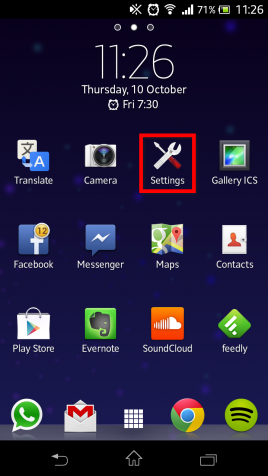
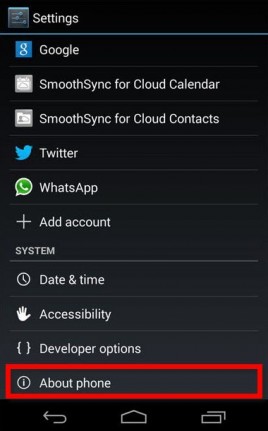
3. Tap About phone or About tablet.
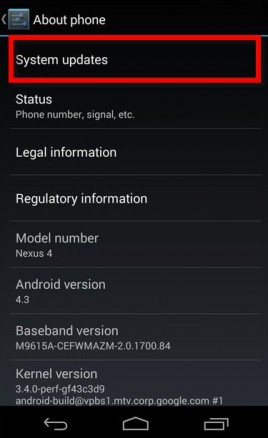
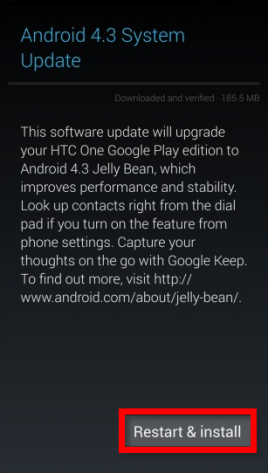
4. Go to System updates (or a similar setting).
5. Press Restart & install to download and install Android 4.4 KitKat on your phone or tablet.
Your Android phone or tablet is now updated with KitKat, the latest version of Android.
Visit our Basic Tips for Android page to keep up on Android news and learn all about KitKat, the newest version of Google’s mobile operating system.
Questions about updating to Android 4.4 KitKat? Tell us in the comments!
You might also like…
How to backup Android app files with Helium
How to sync your Android apps with a PC
Latest from Softonic Editorial Team
You may also like
 News
NewsBe careful with this ChatGPT that is phishing looking to steal your data
Read more
 News
NewsNintendo has just put the brakes on the production of its Switch 2, what's the reason?
Read more
 News
NewsOpenAI wants to beat Anthropic by hiring double the staff: will it be enough?
Read more
 News
NewsThis Korean movie has just become the highest-grossing film in the country's history
Read more
 News
NewsComparison between manual slide creation and AI-assisted presentation generation
Read more
 News
NewsThe new trailer for The Mandalorian and Grogu reveals the return of a beloved character from The Clone Wars
Read more