
How To
Design invitations from scratch with Canva

- September 7, 2022
- Updated: July 2, 2025 at 3:28 AM
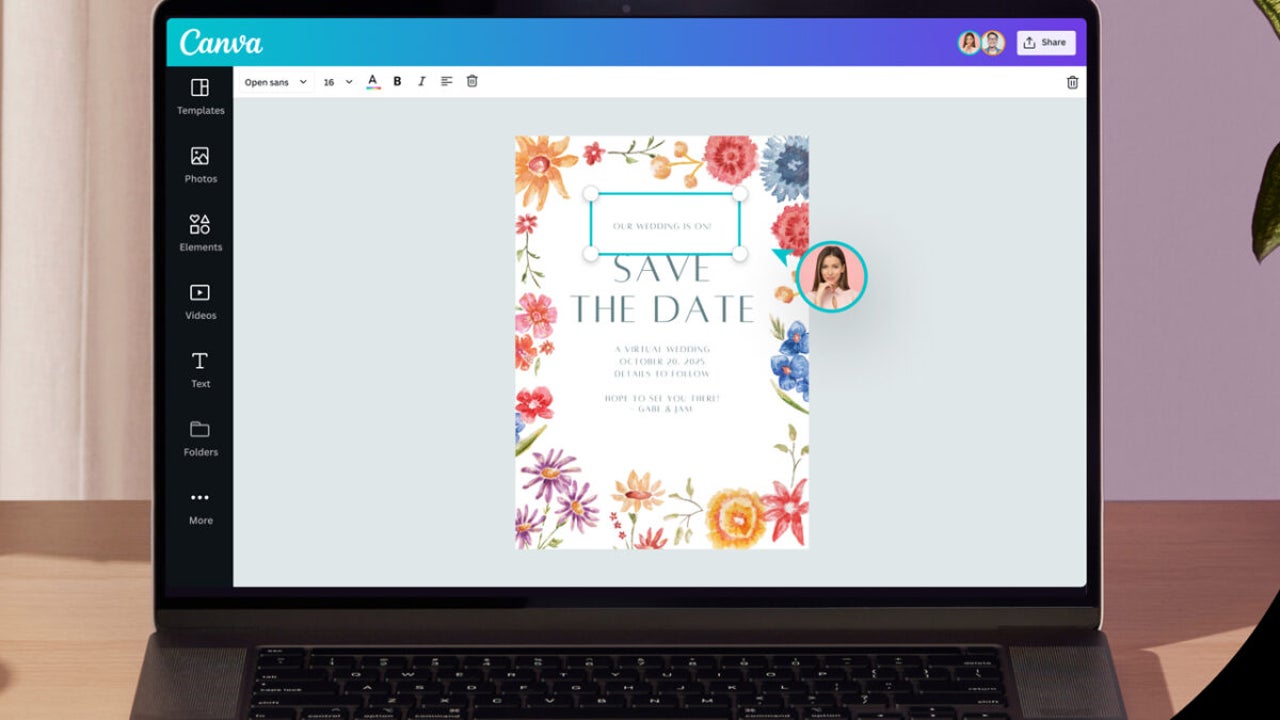
Planning your wedding can be exciting and terrifying all at once. But with that exciting event comes significant financial expenses in planning your big day! The good news is that you can create gorgeous Canva wedding invitations without being a professional graphic designer. It’s an intensely popular platform with over 85 million monthly active users in 190 countries.

Your wedding invitation is the first glimpse of what your guests can expect on your special day, and you want your guests excited to attend the wedding! Without further ado, here are a few simple steps to create a Canva invitation from scratch.
Design invitations from scratch with Canva
Create a Canva account

If you don’t already have an account, you will need to create a Canva account. You can sign up for free or a paid Pro version, which will offer you more add-ons, but the free account still offers impressive features. You can also try Pro for free on the 30-day trial period, leaving you a month to get creative.
Now you can start with your wedding invitation by selecting the ‘Create Design’ button, and if you don’t see the invitation on the drop-down menu, you can search ‘Invitation.’
Create a design
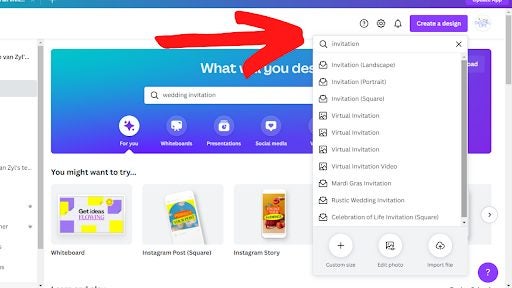
You now have a clean canvas that you can start from scratch to design a Canva invitation that’s fitting for your wedding theme. What we love about this designing tool is the various template featured on the left side, and above the templates, you can choose what Canva invitation you would like to create.
Personalize your invitation
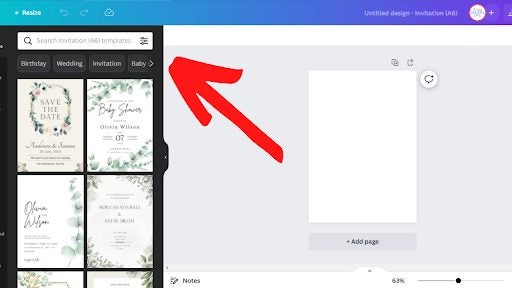
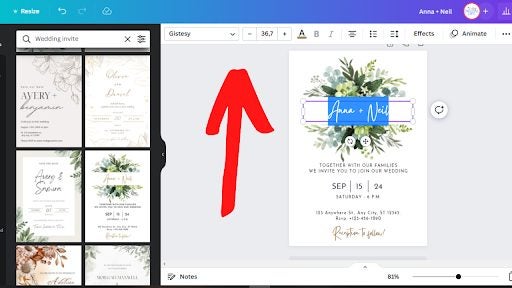
Once you find a Canva wedding invitation template that you want to use, you can start with editing. You can click on each text box to make the necessary changes. If you want to change the font, text color and font size, you can make these changes at the top banner.
Finishing up your design
If you are happy with your design and want to finish the final print, you can do it in these three easy steps:
- On the top right corner, click on the ‘Share’ button, which will open more options to follow.
- Scroll down and click the ‘Download’ button, which will give you more options with a dropdown menu.
- In the dropdown menu, you can opt for the JPG or PNG options if you will be sending the invitations via a social media app. Alternatively, you can choose PDF for print to give to your printing company of choice.
- Once you have downloaded your design, you can save it and, if need be, send your PDF to the printers or load it on a USB and personally take it to the printers.
Canva is an easy-to-use designing tool that makes creating invitations from scratch a breeze. They have an extensive template library, and you can get even more creative as you become more comfortable with the designing application.
The design tool offers over 22 900 invitation templates and can design anything from birthday invitations to graduation invitations. Canva features invitations for any occasion you can think of!
The solution to any invitation
It doesn’t matter what occasion you are planning — you will need to send invitations. But most of us (even if we aren’t on a tight budget) know that having a party or hosting an event can get expensive. The financial expectations from the venue to the decor and not even considering the catering could leave you overwhelmed.
The last thing you want to stress is extra costs for invitations from hiring a graphic designer and the printing costs after that. That is why you can rest assured that with Canva, you will be able to save costs on your invitations.
If you are still unsure of how Canva works and how you can benefit from this designing tool, you may like to read: What is Canva and how it works. Remember, you can use a few invitational templates with the free version, but there are plenty more available with Canva Pro. It may be worth checking out the free trial to test its powerful capabilities.
You may also like
 News
NewsThis weekend you can try one of Obsidian's most acclaimed games from 2025 for free
Read more
 News
NewsAn independent developer has spent 300 hours making the credits for his game because he wants to include everyone
Read more
 News
NewsMatthew Lillard reacts to Quentin Tarantino's negative comments: "I can't hold on to negativity"
Read more
- News
The creators of Silent Hill 2 Remake and Cronos: The New Dawn could be working on the remake of another classic horror game
Read more
- News
The new adaptation of Wuthering Heights has captivated critics
Read more
 News
NewsReduction of video production time: a practical Premiere Pro workflow for marketing teams
Read more