
Article
Chrome Beta for Android gets new gesture controls, advanced image search

- August 22, 2013
- Updated: July 2, 2025 at 8:13 AM
Google has released two new betas of their Chrome browser for the desktop and Android. Both the desktop and Android versions will get a new advanced image search option where you can right-click or long-press to bring up a menu option to search for that image on Google.
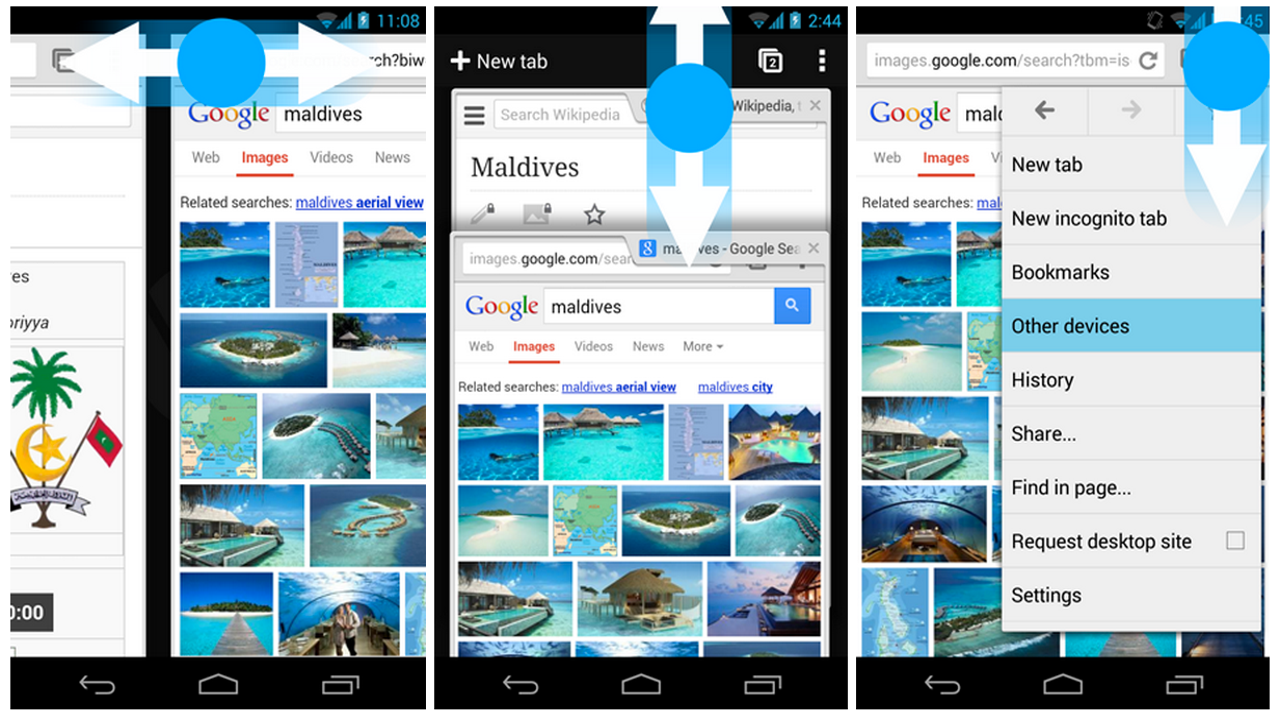
With this update, Android users will also have a few new gesture controls. Previously, users would swipe from the edge of the screen to rotate through open tabs. The new Chrome Beta for Android moves this feature to the top toolbar, making it harder to trigger a tab switch accidentally. Swipe left or right on the toolbar and you’ll cycle through your open tabs. Swipe down from the toolbar brings up the card-style tab switcher. Last but not least, users can save a tab by tapping and holding on the menu button, then dragging their finger to the option they want.
There are more under the hood improvements in Chrome Beta for Android so check them out in the source links below.
Download: Chrome Beta for PC, Mac, Android
Source: Google Chrome Blog | The Chromium Blog
You may also like
 News
NewsThe most interesting indie of the year puts us in the shoes of a crystal demon who skateboards
Read more
 News
NewsAccording to the author of Percy Jackson, the series is more faithful to his books than the movies
Read more
 News
NewsMike Tyson took almost 30 years to discover that an iconic video game character was inspired by him
Read more
 News
NewsWarner Bros. is strongly opposed to Paramount's hostile takeover bid
Read more
 News
NewsCon 26 años a sus espaldas, esta franquicia de juegos de estrategia y RPG anuncia la fecha de lanzamiento de su nueva entrega
Read more
 News
NewsWhat is Fantastic Frontiers? The new trend that Adobe Firefly helps you create effortlessly
Read more