
How To
Facebook Messenger gets another WhatsApp feature

- March 26, 2019
- Updated: July 2, 2025 at 5:11 AM
Ever since Facebook bought WhatsApp, it has been cannibalizing all the messaging app’s best features. Over the years we’ve seen Facebook Messenger bolstered with WhatsApp features like the Delete for Everyone feature and the Unsend message feature. With WhatsApp being such a popular and easy to use messaging app, it makes sense for Facebook to want to emulate its success. So it is no surprise that Facebook Messenger now has another WhatsApp feature to call its own.
You can now send Quoted Replies on Facebook Messenger
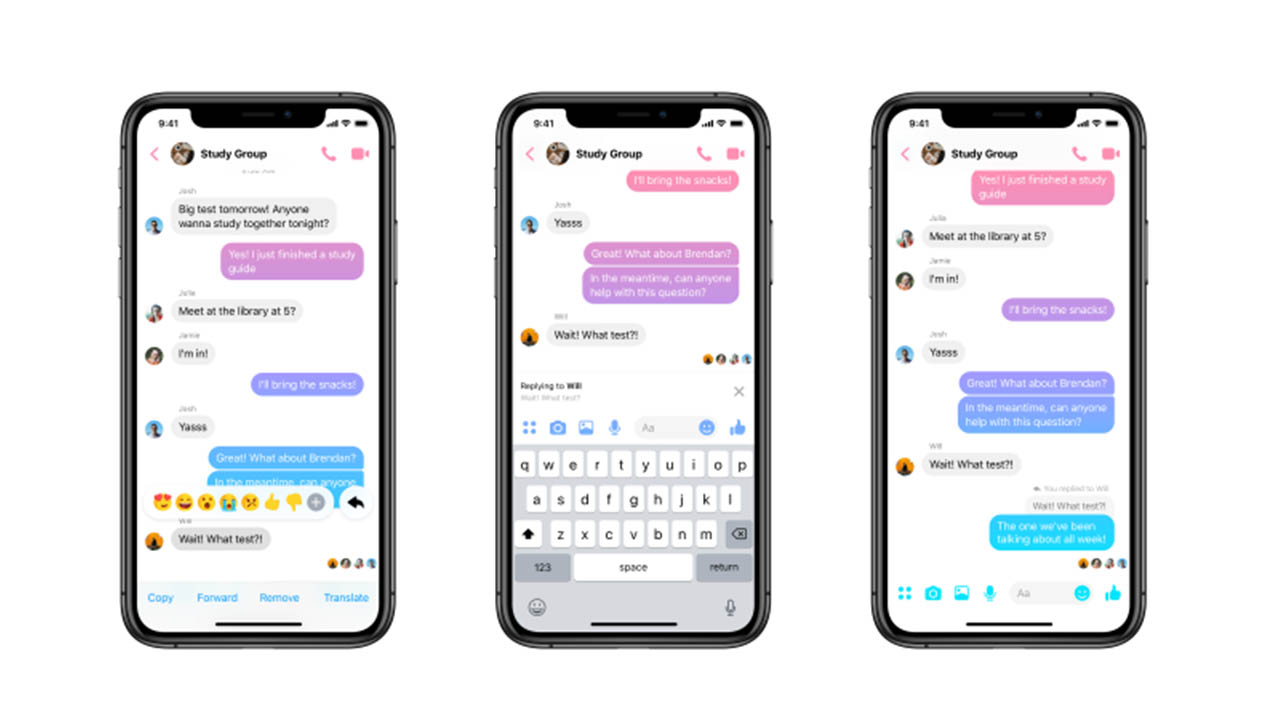
Quoted replies are an incredibly useful feature for a messaging app. Even in one-on-one chats, things can move too quickly for a conversation to flow simply and in one direction. This means you can end up answering a question that has since been pushed off your screen by other messages and replies. In a group chat, this problem is magnified. That is why being able to highlight the particular point you’re responding to and linking it to your response can help conversations flow smoothly and more naturally.

WhatsApp has had this feature for a while and now Facebook Messenger has it, too. Furthermore, Facebook Messenger replies will appear chronologically, exactly like they do in WhatsApp. (That’s different from messaging apps such as Twitter or Slack, where replies open up their own threaded conversations.) You can reply to a message with text, an image, a GIF, or a video and it will appear in the chat just like any other message, except it will have the quoted message you’re replying to attached to the top.
How to reply to messages on Facebook Messenger
There are two slightly different methods for replying to messages on the Facebook Messenger app for mobile and on desktop. Let’s have a look at how to do both:
Replying to messages on Facebook Messenger on Desktop
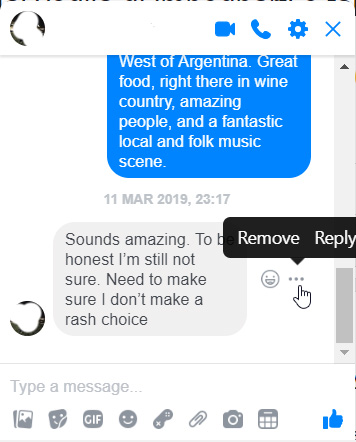
- Find the message you want to reply to and hover the mouse cursor over it.
- You should see a small emoji icon and a three-dot “…” icon appear next to the message.
- Click the three-dot icon and then hit Reply.
- Respond to the message however you see fit.
Replying to messages on Facebook Messenger for Mobile
- Find the message you want to reply to and hold your finger down on it.
- Press the Reply button.
- Respond to the message.
There you have it, a simple way to better organize your Facebook Messenger chats. This method is available now to all Facebook Messenger users. It is worth noting, however, that at the time of writing, the feature wasn’t working on the Messenger Lite app.

You’ll either love or hate the Facebook Messenger redesign
Read nowPatrick Devaney is a news reporter for Softonic, keeping readers up to date on everything affecting their favorite apps and programs. His beat includes social media apps and sites like Facebook, Instagram, Reddit, Twitter, YouTube, and Snapchat. Patrick also covers antivirus and security issues, web browsers, the full Google suite of apps and programs, and operating systems like Windows, iOS, and Android.
Latest from Patrick Devaney
You may also like
 News
NewsThe Wolverine game from Insomniac Games now has a release date
Read more
 News
NewsUbisoft responds to accusations of nepotism by stating that its company has always been family-oriented
Read more
 News
NewsSpider-Man will have a reboot after the huge failures of his latest movies
Read more
 News
NewsBaz Luhrmann takes on the documentary with a recorded concert of Elvis Presley that is much more than a concert
Read more
 News
NewsBefore Mewgenics, McMillen succeeded with a little-remembered platformer that deserves recognition
Read more
 News
NewsThe sequel to a popular Gerard Butler movie is canceled
Read more