
Article
Google Cloud Print now supports any Windows app

- July 22, 2013
- Updated: July 2, 2025 at 8:18 AM
Google Cloud Print, the technology that allows you to print from any device to any printer, now supports any Windows app. Previously, Cloud Print only supported a handful of apps from Google. Now a new driver makes the Cloud Print service available from any Windows app.
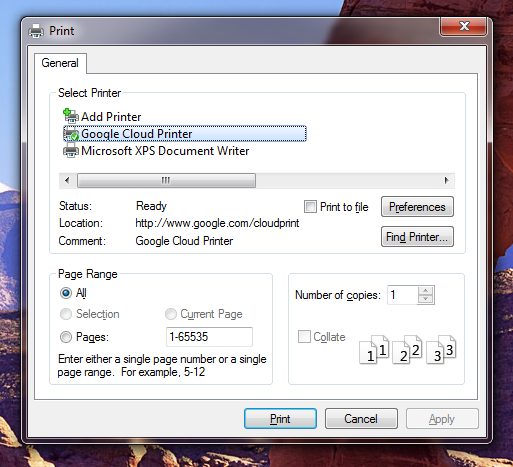
To set up Cloud Print for your computer, all you have to do is download the Google Cloud Printer driver. After installation, you’ll notice an option to send your print to “Google Cloud Printer” from the printer drop-down menu. Google specifically mentions Adobe Reader as a compatible application. With the driver installed, you can now print from your Windows computer, Android device, or any other Google Cloud Print compatible app.
Google has also made it a bit easier to share printers for use as a Cloud Printer. Now users will be able to share a printer by publishing a link. This means anyone with that link has access to that printer and can print anything they want. Be sure you trust your friends and family to not waste your ink!
For more information about Google Cloud Print, check out the source link below.
Source: Google Chrome Blog | Google Cloud Print
You may also like
 News
NewsLuffy and company’s ship runs aground: 'One Piece' has lost viewership on Netflix
Read more
- News
Do you remember that ad for 'The Elder Scrolls VI'? Bethesda is asking you to forget it
Read more
- News
'Stranger Things' returns to theaters, if there is still anyone left after the last season
Read more
 News
NewsHe is an icon of 'Saturday Night Live', and now he announces his British version as if he were Mary Poppins
Read more
 News
NewsThe new Spider-man movie has already released its trailer… in small clips of different one second
Read more
 News
NewsThis year's Oscars have been a ratings failure, no matter who it bothers
Read more