
How To
How to: Disable app auto-updates in new Android Market

- November 2, 2011
- Updated: July 2, 2025 at 8:55 AM
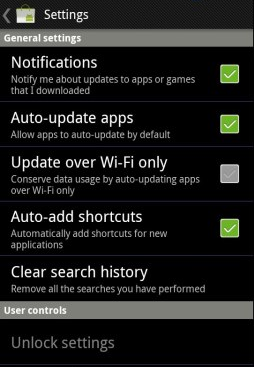
The Android Market was updated today. Among the new features is a setting that automatically updates any applications you have installed on your device when a new version is released.
It sounds like a handy function, and in principal it is. However, it also has the potential to be annoying and disruptive. There are times when you may not automatically want an app to update. Perhaps you’d prefer to read the release notes first to check if the new version takes away a function that you need, or you want to check out user comments to find out if anyone is having stability issues with the new release.
Don’t panic, because there is a way to disable automatic updates from the Android Market. Simply hit the Menu button in Market and make sure that ‘Auto-update apps’ is unchecked. There’s also a new WiFi-only upgrade setting that will save you using up your bandwidth allocation when updating apps.
Incidentally, there are several other changes that come with the new version of the Android Market. These include voice-based search, PIN authentication support to prevent accidental purchase of apps, a star rating chart, and more.
The new version of the Android Market will be made available as an over-the-air download from today. If you still haven’t received it and can’t wait to check it out, though, then you can download it here and install it right now!
You may also like
 News
NewsThe most interesting indie of the year puts us in the shoes of a crystal demon who skateboards
Read more
 News
NewsAccording to the author of Percy Jackson, the series is more faithful to his books than the movies
Read more
 News
NewsMike Tyson took almost 30 years to discover that an iconic video game character was inspired by him
Read more
 News
NewsWarner Bros. is strongly opposed to Paramount's hostile takeover bid
Read more
 News
NewsCon 26 años a sus espaldas, esta franquicia de juegos de estrategia y RPG anuncia la fecha de lanzamiento de su nueva entrega
Read more
 News
NewsWhat is Fantastic Frontiers? The new trend that Adobe Firefly helps you create effortlessly
Read more