
How To
How to: get your hands on Windows 8 Release Preview

- May 31, 2012
- Updated: July 2, 2025 at 8:49 AM
 Microsoft surprised everyone when they accidentally leaked information about releasing Windows 8 Release Preview yesterday. Well the (short) wait is over and now you can get your hands on the newest version of Windows 8! Here’s what you have to do:
Pre-existing Windows 8 installation
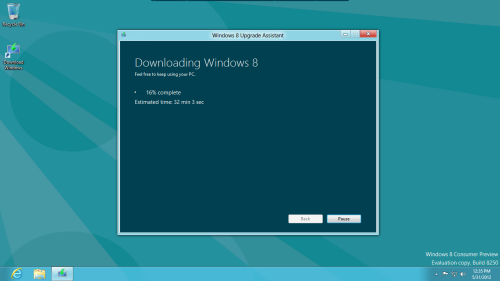
If you already have Windows 8 Consumer Preview installed on machine or running in a virtual machine, just navigate to the Windows 8 Release Preview page and hit “Download Windows 8 Release Preview.” This will download a small application to your desktop. When you run it, the program will check all of your installed applications and hardware to see if anything is going to prevent you from upgrading.
On our machine, everything went smoothly but downloading the update can take over an hour, especially since Microsoft’s servers are slammed with people downloading the Release Preview at the moment. Just be patient and wait for the download to finish!
Starting fresh
If you haven’t been testing out the Windows 8 Consumer Preview or if you just want to start fresh, you can download an ISO image of the entire operating system. This will take a long time to download as well since the images are 2-3 gigabytes each. Once downloaded, you’ll need to mount the ISO image using a program like Virtual CloneDrive. Once you launch the resulting .EXE file, you’ll need the Windows 8 product key, which is TK8TP-9JN6P-7X7WW-RFFTV-B7QPF.
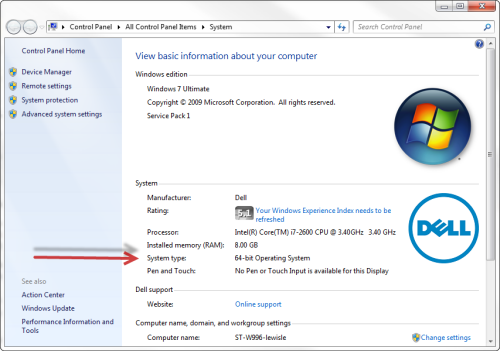
Make sure to download the right version for your computer. Check if your processor is capable of 32 or 64bit processing. To check if your current operating system is 32 or 64 bit, click the Start button, right click ‘Computer’ and ‘Properties.’ You’ll see whether your OS is 32 or 64 bit under ‘System type.’
After the download finishes, just put the image on a USB drive or burn it to a DVD and install!
Be sure to check out our official review of the Windows 8 Release Preview. Also let us know what you think of the Windows 8 Release Preview in the comments below!
You may also like
 News
NewsThis Diablo IV class is overpowered and players have flooded the internet with reviews
Read more
 News
NewsJames Cameron is getting demanding with theaters and sending them instructions on how to watch Avatar 3
Read more
 News
NewsThis incredible RPG introduces an upgrade that leaves fans speechless
Read more
 News
NewsSteam has added an option that will save you a lot of euros
Read more
 News
NewsAsahi is more than just beer, and it has now announced that it will create a unit against cybercrime
Read more
 News
NewsSports are attracting subscribers to streaming services. What's the problem? They don't stick around
Read more