
How To
How to Install the Friday Night Funkin’ Vs Whitty Mod in 3 Easy Steps

- March 2, 2021
- Updated: July 2, 2025 at 4:12 AM
Friday Night Funkin’ is a fun rhythm-based game, available on Windows and Mac, which centers around a guy who wants to kiss his girlfriend before the end of the night. Her father won’t allow it until the main character proves his worth by rapping his way through a host of competitors and ultimately facing the father and beating him too; a classic love story if there ever was one.
The Vs Whitty mod for this game adds a new challenger to the game, rebinds the default keys from WASD to DFJK for more comfortable gameplay, and adds a new input system pulled from other rhythm-based games. Overall, this mod is definitely worth checking out and, in today’s article, we’ll show you how to install the Friday Night Funkin’ Vs Whitty mod safely.
How to Install the Friday Night Funkin’ Vs Whitty Mod
Let’s jump right into the guide and get you set up!
Step 1: Download the mod
You can download the mod on our website.
Step 2: Extract the files
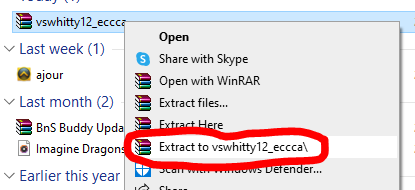
Right-click on the downloaded file and extract it (you will need an unzipping tool, like WinRaR, for this step.)
Step 3: Move the files
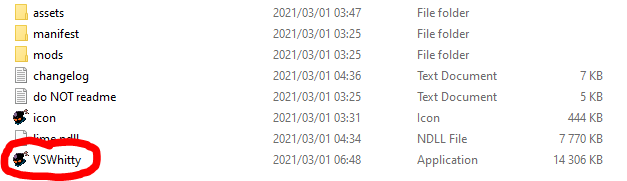
Open the extracted folder, copy the .exe file of the game and paste it into your game’s installation folder, which will replace the file in the game folder.
Now Go And Drop Those Beats!
You can now start your game, and it should work perfectly with the mod. It’s a common misconception that mods are bad for games. Many games have enormously benefited from their modding communities, Skyrim probably being the most notable one.
So, while caution should be taken when downloading and installing mods, they also offer the opportunity to get more out of the games we love. Friday Night Funkin’ is a highly entertaining time-waster game that offers genuine fun and some pretty good music to boot.
And the Whitty mod piles onto that by giving you more gameplay and streamlining the mechanics so that you can rise to the top of the ranks and finally kiss that girl.
Keep up with Softonic
Get our latest tech news first, wherever you read.
Latest from Shaun M Jooste
You may also like
 News
Alan Ritchson before Reacher: his Catching Fire role is back in focus
Read more
 News
Singapore says Megaspeed probe is ongoing: limited help from US and Supermicro
Read more
 News
Google Android XR smart glasses debut with “Hey Gemini,” not “Hey Google”
Read more
 News
Nvidia CEO rumors are false: Jensen Huang is still in charge
Read more
 News
Al Pacino, Schwarzenegger and James Earl Jones: 8 iconic film voices ranked
Read more
 News
James Gunn exits DC Studios: Jeremy Latcham takes over December 1
Read more