
How To
How to Stop Unwanted Web Pages Loading

- May 3, 2017
- Updated: July 2, 2025 at 6:52 AM
Having control over the pages that open and close on your computer is both important and easier than it seems. What’s more, you don’t even need to download any special programs to do it. Just follow these simple steps.
What you Need to Do
In order to block a site, you must first access a system file called “host”. You can reach it in two different ways:
Opening the “Run” tool of your computer (press the Windows + R keys) and, in the blank field, inserting the text “notepad% windir% \ system32 \ drivers \ etc \ hosts” (without quotation marks);
Now open the file as a notepad text and create a new line at the end of the text. In it, you should enter the code “127.0.0.x”, followed by the address of the site you want to block. You have to replace the “x” of the above code with a number that isn’t already on the list.
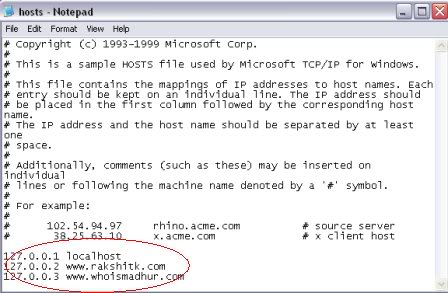
By following the process correctly, you will get something similar to the image above. If everything is OK, the only thing left to do is to save the file and restart your browser.
This way, whenever someone tries to open a locked page, your browser will display a blank screen. There is no error or computer message that will display; the site simply will not open. To allow the address to open again, just delete the corresponding item from the list.
Latest from Softonic Editorial Team
You may also like
 News
NewsEven the Louvre Failed at Cybersecurity — Here’s How You Can Do Better
Read more
 News
NewsAI has been responsible for 50,000 layoffs in 2025: what can we expect in 2026?
Read more
 News
NewsValve will stop producing one of its most popular models of Steam Deck
Read more
 News
NewsA Korean thriller that promises to take over this Christmas arrives on Netflix unexpectedly
Read more
 News
NewsThis Transformers game will disappear from Steam at the end of the year, but you can buy it at a ridiculous price before that happens
Read more
 News
NewsOne of the great directors in the history of cinema has passed away
Read more