
Wonder 3D in Autodesk Flow Studio levels up the game: check out the AI that models anything in seconds
A new AI that can simply model our words.

- March 16, 2026
- Updated: March 16, 2026 at 3:02 PM
Going from an idea to a 3D model has always been one of those tasks that eats up the most time in any workflow, especially when we are talking about video games, visual prototyping, or character development. It is true that part of the creative process lies in the modeling itself, but it is also true that it is more than common to have template files as a base to work from, adapting them so we do not have to start from scratch. Wonder 3D is born from that very idea, but the truth is that it takes it much, much further.
Wonder 3D is Autodesk Flow Studio’s new generative AI model. With this technology, we can start from a text prompt or a reference image and let the platform generate characters or objects for us, then focus our attention on refining them, remixing them, and, of course, reusing them within our projects. At a time when good design makes the difference in the perceived quality of a production, presentation, or development, being able to optimize the time we devote to the most labor-intensive side of 3D production is something well worth keeping in mind. Speed matters here, and flexibility matters even more.
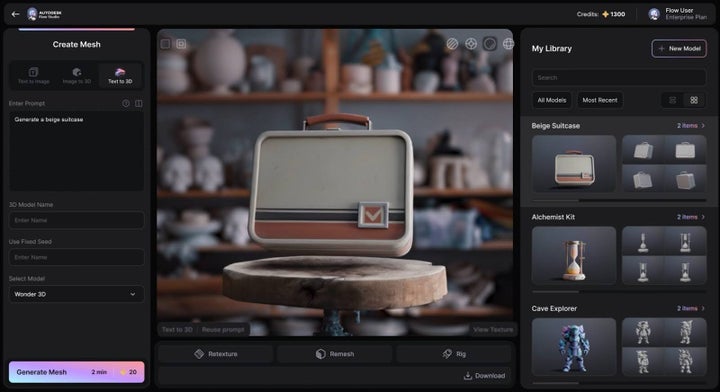
Available from today, March 12, Text to 3D, part of Wonder 3D, is a system that turns a written description into an editable three-dimensional asset. At a time when the industry, especially the video game industry, is looking more and more toward 3D, immersive experiences, and virtual reality, the speed and precision of generation fundamentally change a large part of the creative process. The sooner we can see an idea on screen, the sooner we can polish it and help it grow. Do we want to make changes? They no longer take hours, they take seconds.
Text to 3D brings 3D modeling to the pace of our writing
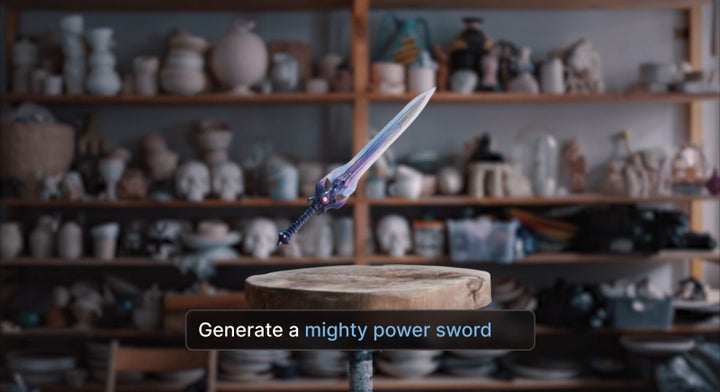
Wonder 3D’s Text to 3D feature is as intuitive as the rest of Autodesk’s generative AI functions. We describe a character, a creature, or a prop, and Flow Studio generates an editable 3D asset with geometry and texture for us.
It is worth pausing for a moment on one word that makes all the difference: editable. When we work in video game development or any visual environment, we want speed, of course, but we also want room to iterate and customize. We have already seen 3D content generators in the past, but the magic of Wonder 3D is that it is presented to us as a flexible foundation: we can adjust shapes, reinterpret the finish, reuse the piece in different scenes, or take it toward different visual styles.
For gaming audiences, being able to produce content this way is especially interesting, because the initial visual exploration carries enormous weight in any development. That is when all the modeling and production work piles up, and it is also when we work with the greatest amount of trial and error. In the early stages of a project, we usually test silhouettes, creatures, weapons, accessories, scene elements, and countless variations of the same concept until we find the right direction. This is exactly where Text to 3D fits in. It allows us to bring ideas to life with impressive speed, compare them, keep what works, and keep moving forward with a much more tangible foundation.
From there, we tweak, refine, improve, and make every adjustment we need, but we do so from within a workflow where presenting 10 different designs for a secondary 3D element is no longer impractical, but rather part of the process of selecting and evolving certain ideas. Creativity speaks a different language the moment we can evaluate an idea that has already been turned into volume.
Lastly, let us keep another important detail in mind: Wonder 3D does not appear as an isolated feature, but as part of the Wonder Tools suite. Alongside Text to 3D, we find Image to 3D, Text to Image, Edit Image, Remesh, Texture, and the combined Remesh & Texture option. With this, Flow Studio proposes a very coherent creative chain: we can start with text, an image, or a sketch and, after generating the first images and editing them with simple prompts, move on to 3D generation. It is not necessary in every case to go through each step, but doing so gives us enormous control over the results and, taken together, greatly reduces the time we will later have to spend on certain touch-ups.
Why Wonder 3D can make a real difference in video games
In the context of GDC 2026, Autodesk presented a session dedicated to Flow Studio for games, and in it the company explained to us how Wonder 3D can help generate assets for storyboard development, prop creation, character ideation, and scene building. It emphasized that, because of its price and technical simplicity, it is a very accessible tool for indie developers, solo creators, and people who are just beginning to move into the world of 3D.
What also stands out from this session, and from every later communication and announcement, is how Autodesk talks to us about iteration, and how clearly it does so. The company itself knows, and tells us, that generative AI works best as part of a creative process, but never as a substitute for it. Far from presenting a system that replaces the artists behind games, it places us in a framework that puts Wonder 3D where it fits best: as a tool for exploring, accelerating, and opening up options.
As for access, Text to 3D, Image to 3D, and Text to Image are available across all Flow Studio plans, from Free to Enterprise, and each generation costs 20 credits regardless of the plan. The difference between tiers lies in monthly capacity, resolution, storage, and the number of concurrent generations, ranging from one in Free to 20 in Enterprise.
The Free plan, let us remember, offers us 300 credits per month, which works very well for initial tests or an occasional trial. Lite goes up to 2 100 credits, Standard reaches 6 000, Pro rises to 12 000, and Enterprise comes in at 48 000 monthly credits. With this range, whether we are a small studio or a large developer, generative AI scales with us.
In Flow Studio we can, of course, export elements and scenes to tools such as Maya, Blender, Unreal Engine, and Autodesk 3ds Max through the USD format, in addition to working with motion capture data, camera data, and other very useful layers. So if we think about Wonder 3D from a video game standpoint, it has even more value, because it connects generation with the follow-up work in the tools that are already standard across the industry.
The best time to try Flow Studio is now
On top of all this, we also have to talk about the fact that, between March 16 and March 20, there will be a flash sale with up to 20% off the first-year subscription to several products, including Autodesk Flow Studio. If we are already considering joining the platform or expanding how we use it, the timing could not be better to take advantage of the new 3D generation tools.
Autodesk launched freemium access to Flow Studio in August 2025 and reorganized its pricing tiers to make the tool more accessible. Now, coinciding with the launch of the new features, we have the best excuse to try it and take a step into the world of 3D.
Wonder 3D in Autodesk Flow Studio brings together several points that are well worth paying attention to: AI for 3D modeling, 3D character generation from text, prop creation for video games, integration with professional pipelines, and scalable access starting from a free plan. These are many fronts, all highly current, and all of them connect with the creative market’s main goal: to produce faster, validate as early as possible, and maintain the quality and flexibility of decisions throughout the entire process.
Autodesk, as with the rest of its tools, makes what could be a very abstract launch more concrete by focusing on a function that gives us a more agile way to start, to explore, and to keep developing. It is a way of approaching the beginning of a project, almost by playing and experimenting, that fits very well with what we usually need in a studio. AI brings much more value when it comes on the scene to genuinely speed up the work.
If we had to sum up the most interesting thing about Wonder 3D in a single idea, it would be this: Autodesk Flow Studio has found a very convincing way to bring 3D modeling closer to natural language, and it has done so in a way that will be especially appealing to video game developers. From character ideation to prop creation and the initial building of scenes, Text to 3D allows our ideas to take shape almost at the same pace as we think them. And when a tool manages to make thinking, testing, and building even more fun, it deserves our full attention.
Architect | Founder of hanaringo.com | Apple Technologies Trainer | Writer at Softonic and iDoo_tech, formerly at Applesfera
Latest from David Bernal Raspall
You may also like
 News
NewsBe careful with this ChatGPT that is phishing looking to steal your data
Read more
 News
NewsNintendo has just put the brakes on the production of its Switch 2, what's the reason?
Read more
 News
NewsOpenAI wants to beat Anthropic by hiring double the staff: will it be enough?
Read more
 News
NewsThis Korean movie has just become the highest-grossing film in the country's history
Read more
 News
NewsComparison between manual slide creation and AI-assisted presentation generation
Read more
 News
NewsThe new trailer for The Mandalorian and Grogu reveals the return of a beloved character from The Clone Wars
Read more