Editor's choice
2.5
4 reviews
ASRock Polychrome RGB Sync is a remarkable, free-to-use software that allows you to take full control over your PC’s lighting aesthetics. Designed specifically for…
Update: Sep 7, 2026 · 44 apps reviewed
Color picker tools for Windows help designers capture exact shades from screens, images, and brand assets without guessing. The strongest options go beyond a simple eyedropper, adding history, palette management, format conversion, and quick access to HEX, RGB, and HSL values. They are especially useful for UI work, branding, illustration, and any project where color consistency matters across files and devices. When choosing one, look for precision, keyboard shortcuts, clipboard support, and whether it fits smoothly into your workflow. A good picker saves time and reduces color mismatch from the first sample to the final export. Explore top picks for Windows.
4 reviews
ASRock Polychrome RGB Sync is a remarkable, free-to-use software that allows you to take full control over your PC’s lighting aesthetics. Designed specifically for…
Get our latest tech news first, wherever you read.
3 reviews
Design Capabilities
Export & Collaboration
Template & Asset Ecosystem
The tool does one job well: it grabs exact screen colors and gets the code copied fast, which is handy when you need to match assets across design apps. I’d use it as a lightweight utility alongside a full graphic design suite, not as a replacement for one.
422 reviews
Rainbow Folders provides users with a quick and streamlined method to change the colour of their existing folder icons. Not only is this able…
Experience ColorControl by Maassoft, a Windows utility that bridges PC graphics hardware and modern displays to expose advanced picture controls. The app lets you…
223 reviews
Design Capabilities
Export & Collaboration
Template & Asset Ecosystem
ColorPix is a focused utility for capturing exact on-screen colors, and the zoom tool makes it useful when a design depends on a precise match. It is limited as a standalone graphic design tool, though, because the fuller feature set depends on Color Scheme Studio and the paid version is no longer available online.
84 reviews
Design Capabilities
Export & Collaboration
Template & Asset Ecosystem
ColorMania focuses on one job: pulling precise colors into a graphic design workflow without slowing you down. It is strongest as a companion tool for artists and web designers who need broad format support and pixel-level sampling, not as a full design suite.
15 reviews
Export & Collaboration
Design Capabilities
Template & Asset Ecosystem
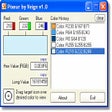
Pixeur keeps things narrow and useful: it is a free Windows color picker with history, so it handles quick color matching without extra clutter. I’d recommend it for designers who need to capture and revisit exact colors fast, not for anyone expecting full layout, typography, or export tools.