Digital Clock Apps for Timers, Alarms and Focus | 11

Update: Sep 7, 2026 · 583 apps reviewed

Digital clock apps do more than show the time in a large, easy-to-read format. The best ones combine world clocks, alarms, countdown timers, stopwatches and focus tools in a clean interface that works well on desktops and mobile devices. Some are built for bedside use, while others help with time tracking, presentations or keeping multiple time zones visible at once. When choosing one, look for readability, customization, reliable alerts and extras like widgets, themes or always-on display support. Strong options make time management feel effortless instead of cluttered.

Chennon Kyle CK Santaren

Chennon Kyle CK Santaren

Tech & Lifestyle Writer

Tech and lifestyle writer with a sharp eye for digital trends, gaming gems, and productivity tools. CK draws on his e-commerce background to deliver concise, practical software recommendations.

Top programs about Digital Clock

  • 3.9

    10 reviews

    A minimalist Chrome clock for distraction-free planning

    • Real-time desktop clock on Chrome's homepage
    • 24-hour time display for a clearer daily read
    • Custom color and size to match your setup
    • Drag-and-drop positioning for flexible placement

    Ideal for

    • Chrome homepage minimalists
    • Personal desktop timekeeping
    • Business browsing setups
    • Capture & Organization

      3 / 10
    • Sync & Integration

      3 / 10
    • Task & Time Management

      3 / 10
    Clockwise strips Chrome’s default homepage down to a live clock, which makes it a neat fit for anyone who wants a cleaner, more focused start page. It’s lightweight and customizable, but it’s still just a clock extension, so it won’t help with notes, reminders, or task tracking.
    Chennon Kyle CK Santaren
  • Keep up with Softonic

    Get our latest tech news first, wherever you read.

  • 4.8

    A giant clock with alarms, timers, and stopwatches

    • Giant digital clock with hours, minutes, seconds, date
    • Set multiple alarms with repeat, snooze, and custom tones
    • Countdown timer that rings loudly at zero
    • Stopwatch with lap tracking for precise timing

    Ideal for

    • Desk clock replacement on Android
    • Multiple daily alarm routines
    • Timed tasks and lap tracking
    • Task & Time Management

      8 / 10
    • Capture & Organization

      3 / 10
    • Sync & Integration

      3 / 10
    The app turns an Android device into a large, readable clock with alarms, timers, and a stopwatch in one place. I’d use it when the priority is keeping time visible and dependable, though its planning features stay focused on reminders rather than deeper note-taking or task organization.
    Chennon Kyle CK Santaren
  • 4.9

    Always-on clock widgets that keep key info visible

    • Digital and analog clock widgets for quick glances
    • Always-on display keeps time and updates visible
    • Custom text and color themes personalize the widget
    • Large AMOLED digits improve readability from afar

    Ideal for

    • Busy commuters checking the time fast
    • Home screens with a personal look
    • AMOLED phones with constant visibility
    • Capture & Organization

      3 / 10
    • Sync & Integration

      3 / 10
    • Task & Time Management

      3 / 10
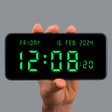
    The app’s strongest point is constant visibility: time, calendar events, and notifications stay on screen without repeated unlocking. I’d treat it as a lightweight organization aid for people who want a glanceable widget more than a full planning suite.
    Chennon Kyle CK Santaren
  • 5

    1 reviews

    Clock faces and alarms for everyday time tracking

    • Set alarms to mark important events and routines
    • Use timers and countdowns for scheduled tasks
    • Track elapsed time with the built-in stopwatch
    • Switch between analog and digital clock faces

    Ideal for

    • Android users managing daily reminders
    • Cooking and workout timing
    • Custom clock display themes
    • Task & Time Management

      7 / 10
    • Capture & Organization

      3 / 10
    • Sync & Integration

      3 / 10
    The strongest part of 777Bet-Clock is its mix of alarms, timers, countdowns, and a stopwatch in one lightweight Android clock utility. The trade-off is that it stays focused on timekeeping rather than deeper notes, calendar, or task-planning features, so it suits basic organization more than full productivity workflows.
    Chennon Kyle CK Santaren
  • 4.2

    Customizable clock display for always-visible time checks

    • Adjust clock style to match your workspace
    • Show or hide the date on screen
    • Change font and background colors
    • Reposition the clock where it's easiest to see

    Ideal for

    • Android home screen clock
    • Always-visible date display
    • Custom color and font setup
    • Capture & Organization

      3 / 10
    • Sync & Integration

      3 / 10
    • Task & Time Management

      3 / 10
    Pari Digital Clock focuses on one job: keeping time visible with just enough customization to fit your setup. It suits Android users who want a lightweight clock display they can place and style without extra clutter.
    Chennon Kyle CK Santaren
  • 4.6

    A nostalgic clock with alarms, timer, and chronometer

    • Customizable ticking sounds for seconds, minutes, and hours
    • Choose tic-tac or cuckoo tones for clock chimes
    • Built-in chronometer for timing short tasks
    • Timer and alarm functions for reminders and deadlines

    Ideal for

    • Nostalgic desk timekeeping
    • Multilingual clock app
    • Simple timing and alarms
    • Task & Time Management

      5 / 10
    • Capture & Organization

      3 / 10
    • Sync & Integration

      3 / 10
    The app stands out with its customizable old-school ticking sounds, which gives everyday timekeeping a more distinctive feel than a standard clock. I’d use it for light planning and reminder needs, not as a full notes or task manager.
    Chennon Kyle CK Santaren
  • 4.5

    Maritime bell timing for nautical routines

    • Rings every 30 minutes like a ship's bell watch
    • Plays brass bell, iron bell, harbor call, or sonar ping
    • Runs in the background with the screen on or off
    • Brings a historical maritime timekeeping system to Android

    Ideal for

    • Maritime history enthusiasts
    • Background audio on Android
    • Classic bell sound options
    • Capture & Organization

      3 / 10
    • Sync & Integration

      3 / 10
    • Task & Time Management

      3 / 10
    The app’s strength is its faithful ship’s bell timing, which gives Android a very specific maritime rhythm instead of a normal reminder setup. I’d only recommend it if that nautical soundscape matters to you, because it is more of a themed timekeeper than a full notes or planning tool.
    Chennon Kyle CK Santaren
  • 4.4

    A distraction-free clock for desks and bedside tables

    • Large digital time readout that's easy to glance at
    • Auto-adjusts font size to fit narrow or wide times
    • Landscape and portrait modes for different setups
    • Transparency settings for a cleaner bedside display

    Ideal for

    • Bedside alarm clock replacement
    • Tablet dock on a desk
    • Low-clutter home office display
    • Capture & Organization

      3 / 10
    • Sync & Integration

      3 / 10
    • Task & Time Management

      3 / 10
    Huge Clock keeps things stripped down to the essentials: a big, readable time display with a few useful display options. It makes sense on tablets, desks, and bedside tables, but it is more about visibility than planning, reminders, or organization.
    Chennon Kyle CK Santaren
Signed in to Softonic as