Virtual DJ Software for Mixing and Live Performances | 5
Update: Sep 7, 2026 · 98 apps reviewed
Virtual DJ software turns a laptop into a full mixing desk, combining beatmatching, looping, effects, and live performance controls in one workspace. The strongest options balance low-latency audio, flexible deck layouts, and smooth library management, so you can cue tracks quickly without breaking the flow. Some tools focus on beginner-friendly auto-mixing, while others offer deeper control for scratching, sampling, and video mixing. When choosing, look at controller support, file compatibility, recording features, and how well the interface fits your style behind the decks.
Top programs about Virtual Dj
- 4
Real-time DJ mixing with EQ and effects control
- Virtual DJ mixer for precise live track blending
- Adjust levels, EQs, and effects in real time
- Beat making tools for building custom soundscapes
- High-quality audio processing for polished mixes
Ideal for
- Bedroom DJs and live performers
- Beat-making and soundscape sessions
- Polished mixes with real-time control
Editing Toolset
6 / 10Depth of editing: multitrack, effects, MIDI, and instrument or loop libraries.Export & Workflow
6 / 10Output formats, batch processing, plugin support, and DAW integration.Recording Quality
5 / 10Input flexibility, recording fidelity, latency, and monitoring features.
The strongest part here is the live mixing focus: the editor gives you hands-on control over levels, EQs, and effects with audio processing that aims for a professional finish. It suits DJs who want to shape transitions and build beats on the fly, though the source does not point to deeper production features like multitrack editing or plugin workflows.
Martin Francis Hernandez - 4.1
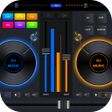
Mobile DJ mixing with BPM sync and effects
- Virtual two-deck mixing with crossfader control
- Automatic tempo and key detection for tight blends
- 3-band EQ, channel filters, and pitch shifting
- Real-time effects, sampler, and smart looping
Ideal for
- Party DJs on Android
- BPM-synced live transitions
- Tablet-based mixing sessions
Editing Toolset
7 / 10Depth of editing: multitrack, effects, MIDI, and instrument or loop libraries.Export & Workflow
5 / 10Output formats, batch processing, plugin support, and DAW integration.Recording Quality
4 / 10Input flexibility, recording fidelity, latency, and monitoring features.
The strongest part of this editor is its live DJ workflow: two-track playback, BPM sync, crossfading, and channel-level EQ give you the core tools for quick mixes on a phone or tablet. It is less about deep studio production than about building energetic party sets with minimal setup.
Martin Francis Hernandez - 5
1 reviews
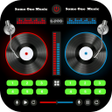
Mobile DJ mixing with synced dual decks
- Mix tracks seamlessly with precise synchronization
- Two DJ cross-discs for hands-on track blending
- Add sound effects to shape custom DJ remixes
- Boost volume and bass for heavier playback
Ideal for
- Android party DJs
- Beat-making practice sessions
- Bass-heavy remix playback
Editing Toolset
5 / 10Depth of editing: multitrack, effects, MIDI, and instrument or loop libraries.Export & Workflow
5 / 10Output formats, batch processing, plugin support, and DAW integration.Recording Quality
4 / 10Input flexibility, recording fidelity, latency, and monitoring features.
The strongest part of Virtual DJ Mixer 3D is its focus on seamless track mixing with precise sync, dual cross-discs, and built-in sound shaping tools. It reads as a straightforward mobile DJ mixer rather than a full audio editor, so it suits remixing and beat-building more than detailed production work.
Martin Francis Hernandez - 2.3
3 reviews
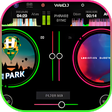
Beat-matching control with tempo, pitch, and BPM tweaks
- Equalizer for shaping the mix with finer control
- Tempo, pitch, and BPM adjustments for beat matching
- Create, open, and edit playlists from SD card or MP3
- Waveform display plus two DJ scratching sounds
Ideal for
- Android tablet performers
- MP3 playlist set builds
- On-device party mixes
Editing Toolset
5 / 10Depth of editing: multitrack, effects, MIDI, and instrument or loop libraries.Export & Workflow
4 / 10Output formats, batch processing, plugin support, and DAW integration.Recording Quality
3 / 10Input flexibility, recording fidelity, latency, and monitoring features.
The strongest draw here is the mix-control set: equalizer tweaks, tempo and BPM changes, waveform monitoring, and scratching give it the basics of a compact DJ tool. I’d treat it as a simple mobile mixing option for casual set building, not a full production editor.
Martin Francis Hernandez - 4
Two-deck mixing with scratch controls on mobile
- Two virtual turntables with a real crossfader
- Scratch, loop, and pitch-shift tracks live
- 3-band equalizer with sound effects and filters
- Import playlists, save remixes, and split output
Ideal for
- Phone-based DJ practice
- Playlist remix sessions
- All-audio-format libraries
Editing Toolset
5 / 10Depth of editing: multitrack, effects, MIDI, and instrument or loop libraries.Export & Workflow
5 / 10Output formats, batch processing, plugin support, and DAW integration.Recording Quality
4 / 10Input flexibility, recording fidelity, latency, and monitoring features.
The app centers on live two-deck mixing, with a crossfader, scratch controls, and loop tools that suit casual DJ practice on a phone or tablet. I like that it also covers playlist import and remix saving, but this is still a lightweight mobile mixer rather than a full desktop production environment.
Martin Francis Hernandez - 4.4
Learn DJ basics by mixing and recording tracks
- Practice tempo, pitch, chords, scales, and patterns
- Use the MP3 player and mixer to build mixes
- Record your own music after playing tracks
- Built for Android users learning the fundamentals of DJing
Ideal for
- Beginners learning beat matching
- Android music practice sessions
- Home DJ mix recording
Editing Toolset
4 / 10Depth of editing: multitrack, effects, MIDI, and instrument or loop libraries.Recording Quality
4 / 10Input flexibility, recording fidelity, latency, and monitoring features.Export & Workflow
3 / 10Output formats, batch processing, plugin support, and DAW integration.
Real Dj Simulator focuses on the basics: it teaches core DJ concepts and lets you play tracks, mix them, and record your own music. I’d treat it as a learning tool for beginners with some music knowledge, not as a full audio editor or production suite.
Martin Francis Hernandez - 4
Mobile DJ mixing with tempo and pitch control
- Mix and remix songs from your device
- Add effects to shape each track's sound
- Adjust tempo and pitch for live-style blends
- Use it as a simple music player, too
Ideal for
- Bedroom DJs on Android
- Track blending on the go
- Music playback with effects
Editing Toolset
4 / 10Depth of editing: multitrack, effects, MIDI, and instrument or loop libraries.Export & Workflow
4 / 10Output formats, batch processing, plugin support, and DAW integration.Recording Quality
3 / 10Input flexibility, recording fidelity, latency, and monitoring features.
The app’s strength is its straightforward mobile DJ workflow: pick tracks from your device, blend them, and tweak tempo, pitch, and effects without much setup. It’s a lightweight option for casual remixing, but it doesn’t go beyond basic mixing into deeper audio production tools.
Martin Francis Hernandez - 4.8
Mobile DJ mixing for real-time party sets
- Mix and remix songs in real time
- Play DJ-friendly music on Android devices
- Simple controls for fast track management
- Responsive setup for tablets and smartphones
Ideal for
- Android party hosts
- Tablet DJ sessions
- Live remix practice
Editing Toolset
4 / 10Depth of editing: multitrack, effects, MIDI, and instrument or loop libraries.Export & Workflow
3 / 10Output formats, batch processing, plugin support, and DAW integration.Recording Quality
3 / 10Input flexibility, recording fidelity, latency, and monitoring features.
The tool focuses on live mixing and remixing on Android, with a straightforward layout that keeps party sets moving. It does not promise the deeper editing, recording, or export controls you’d expect from a full production app, so I’d treat it as a lightweight DJ mixer rather than a studio replacement.
Martin Francis Hernandez