DJ Mixer Software for Smooth Live Mixing Sessions

Update: Sep 7, 2026 · 473 apps reviewed

DJ mixer software turns a laptop into a live performance console, combining beatmatching, crossfading, looping and effects in one workspace. The strongest tools help you keep tracks locked in time, shape transitions cleanly and react fast when a crowd changes energy. Choice comes down to workflow: some users want simple two-deck mixing, while others need multi-deck control, sampler pads, microphone handling or hardware support. The best options balance low-latency playback, stable performance and clear waveforms so you can mix confidently without losing the beat.

Martin Francis Hernandez

Martin Francis Hernandez

Games & Software Reviewer

Passionate gamer and content writer, Martin specializes in video game reviews and software coverage across commercial, business, and multimedia applications. He helps readers navigate the digital landscape with confidence.

Top programs about Dj Mixer

  • Editor's Choice
    3.9

    68126 reviews

    Real-time DJ mixing with stems, effects, and video

    • Multi-deck mixing with ModernEQs for clean transitions
    • Stem pads and instant acapella/instrumental separation
    • Unlimited sampler plus built-in pro audio effects
    • Video mixes, video effects, and library management

    Ideal for

    • Club DJs with controller setups
    • Live mashups from streaming catalogs
    • Video-backed performance sets
    • Editing Toolset

      9 / 10
    • Export & Workflow

      8 / 10
    • Recording Quality

      6 / 10
    VirtualDJ brings a lot of live-performance power to a PC, from smooth real-time remixing to stem separation, effects, and video mixing. Its broad controller support and streaming access make it flexible, but it really comes alive with dedicated hardware rather than just a keyboard and mouse.
    Martin Francis Hernandez
  • 4.3

    388 reviews

    DiscDj 3D Music Player - 3D Dj Music Mixer Studio is a multimedia application created by GameG. The application allows mixing of saved music…

  • 4.4

    45 reviews

    Mobile DJ mixing with BPM detection and live recording

    • One-click virtual turntable for hands-on mixing
    • Sound effects and equalizer for shaping tracks
    • Automatic BPM detection plus tempo and beat sync
    • Built-in recorder and support for MP3, FLAC, WAV

    Ideal for

    • Mobile DJs on the go
    • Live set practice sessions
    • MP3, M4A, FLAC, WAV workflows
    • Editing Toolset

      5 / 10
    • Recording Quality

      5 / 10
    • Export & Workflow

      4 / 10
    The strongest draw here is the compact DJ toolkit: turntable control, BPM detection, effects, and live recording all sit in one mobile app. Frequent ads are the main drawback, but the format support and mix features still make it a practical pick for quick on-the-go production.
    Martin Francis Hernandez
  • 4.1

    1456 reviews

    Built for casual mixing with a big sound-effects library

    • Mix and create tunes with a wide sound-effects set
    • Import tracks from an SD card into the library
    • Add effects to existing tunes for unique mixes
    • Share your own tunes with other users

    Ideal for

    • Budding DJs learning the basics
    • SD card music imports
    • Casual home mix projects
    • Editing Toolset

      5 / 10
    • Export & Workflow

      4 / 10
    • Recording Quality

      3 / 10
    The SD card import support and built-in sound effects make this a handy starter tool for casual music mixing. I’d only recommend it if you can live with the pop-up ads and don’t need pro-level production features.
    Martin Francis Hernandez
  • 4.8

    25 reviews

    Club-style mixing with scratching, looping, and pitch control

    • Mix, remix, scratch, loop, or pitch tracks live
    • Virtual turntable setup for DJ-style performance
    • Music equalization to balance sound effect volume
    • Browse songs by album, folder, or genre

    Ideal for

    • Beginner and pro DJs
    • Live party mixing
    • Library browsing by genre
    • Editing Toolset

      5 / 10
    • Export & Workflow

      5 / 10
    • Recording Quality

      4 / 10
    The strongest draw here is the live DJ workflow: you can mix, scratch, loop, and pitch tracks from a virtual turntable without giving up control over sound balance. I’d recommend it to DJs who want performance-first mixing and quick library browsing, but not to anyone expecting deep multitrack editing or studio-style production tools.
    Martin Francis Hernandez
  • 4.4

    157 reviews

    Wireless control for live DJ mixing on the move

    • Wireless control of VirtualDJ from phones and tablets
    • Beat mixing, effects, and samplers for live sets
    • Monitor mixes remotely while the PC drives audio
    • Supports scratch turntable and video mixing workflows

    Ideal for

    • Mobile DJs on stage
    • Live gig mixing setups
    • Video mixing performances
    • Editing Toolset

      5 / 10
    • Export & Workflow

      5 / 10
    • Recording Quality

      4 / 10
    The standout here is wireless control of VirtualDJ, letting DJs manage live sets from a phone or tablet while the computer keeps the audio running. I like the breadth of performance tools, but the lack of clear security and privacy details for wireless connectivity is a real gap.
    Martin Francis Hernandez
  • 3.5

    690 reviews

    Beat-synced DJ mixing with dual virtual decks

    • Two virtual decks for live track mixing
    • Beat-Sync Engine for automatic tempo matching
    • Looping and cue points for precise control
    • FX and EQ controls with support for MP3, AAC, FLAC, WAV

    Ideal for

    • Beginners learning DJ transitions
    • Mobile sets without a laptop
    • MP3, AAC, FLAC, and WAV sets
    • Editing Toolset

      5 / 10
    • Export & Workflow

      5 / 10
    • Recording Quality

      4 / 10
    CrossDJ Free gives beginners and intermediate DJs a solid on-the-go mixing setup, with dual decks, beat-sync, looping, and responsive waveform control. The free version is held back by ads, some format recognition gaps, and poor recording audio quality, but Mixvibes keeps updating it and that matters for stability.
    Martin Francis Hernandez
  • 4.4

    90 reviews

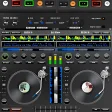
    Made by professional DJs, this free app can be used by both hobby DJs and professionals alike. A fully equipped mixing table in your…

Frequently asked questions (FAQs) about this topic

What features should good DJ mixer software have?

Look for beatmatching, tempo control, cue points, looping, EQ and effects at minimum. Clear waveforms and low-latency audio are also important because they make transitions easier to hear and control. If you perform live, hardware controller support is a major plus.

Can DJ mixer software work without a controller?

Yes, many DJ apps can be used with just a mouse, keyboard or touchscreen. That said, a controller usually gives you faster access to jog wheels, faders and pads. For regular live mixing, physical controls are much easier to manage.

Is free DJ mixer software good enough for beginners?

Free tools can be perfectly fine for learning beatmatching, basic transitions and library management. The main limits are often fewer effects, fewer decks or locked recording features. They are a good starting point if you want to practice before upgrading.

Do DJ mixer apps support streaming music libraries?

Some do, but support varies by platform and subscription service. Many apps still work best with local files because they offer more reliable playback and offline use. Always check compatibility before relying on streaming for a set.
Signed in to Softonic as