Audio (1531 programs)
Pros: Free download. Great range of features.
Cons: Some issues with alternative systems. No Blu-ray functionality.
Pros: Allows content syncing in both ways. Synchronization is instantaneous.
Cons: Lacks many advanced options.
Pros: Allows DirectSound3D soundcards to work on Vista. Easy to install.
Cons: Doesn't work with all games yet.
Pros: The most original music tool ever. Includes a wide range of instruments. Generates music automatically.
Cons: You don't have much control over the creation process.
Pros: Finds the lyrics to your favourite iTunes songs. Easy to use.
Cons: May replace old lyrics with wrong ones. Can be slow at accessing databases. Doesn't work with iTunes 9. Project discontinued.
Pros: Music sheets editor. Test on theory. Good resource to understand notes and accords.
Cons: No simple mode display. Not so user friendly.
Pros: Very light on resources. Extremely fast. Can be controlled with keyboard shortcuts or media keys. Includes tools to rip CDs and convert files. Support for all popular formats. Optional portable installation. Also available on Android.
Cons: Not suitable for eye-candy lovers!.
Pros: Easily move, cut and manage tracks on the timetable. Add as many tracks and voices as you want.
Cons: It cannot resize the window. Voice Removal function not effective.
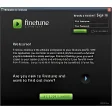
Pros: Helps you find music you like. Based on Adobe AIR.
Cons: Doesn't have a big user community.
Pros: Easy to edit and share songs. Quick and easy editing.
Cons: Doesn't allow advanced editing. Requires signing-up to share.
Pros: Make your own sounds.
Cons: Frequency of the sound is not relaxing.
Pros: Easy to use. 128 different instruments.
Cons: Basic looking style and interface. No different skins. Limited melodies.
Pros: Very good at organising music. Includes radio stations. Can schedule auto file organization. Good tag manager.
Cons: Help and support isn't great. Radio stations were unreliable and hard to add.
Pros: Intuitive interface, like a real turntable. Easy to use for everyone. Supports MP3.
Cons: Doesn't allow you to save mixes. Some functions are disabled.
Pros: Quickly analyses music's bit rate. Saves BPM info in MP3's ID3 tag.
Cons: Strange BPM results for tested song files. BPM can't define a song's style.
Pros: Allows you to share from both Winamp and iTunes. Easily allows you to browse friend's albums. Allows you to make playlists quickly.
Cons: Doesn't allow you to share music purchased on iTunes. Limited to 30 friends.