
How To
How to add your podcast to iTunes


- April 15, 2019
- Updated: July 2, 2025 at 5:06 AM
Despite all the competition, Apple Podcasts is still the place that the majority of listeners go to when searching for new podcasts. They’ve been in the game since the very beginning, and it would be completely irresponsible to not have your podcast on their site. Thankfully, they also have one of the easiest application processes for submitting your podcast, so you don’t have to go through an extreme process to get onto their platform. Here is an easy step by step guide on how to put your podcast on iTunes.
How to add your podcast to iTunes
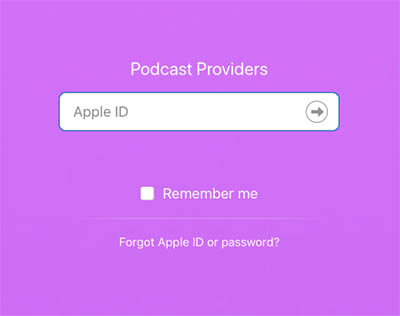
Step 1: Go to the iTunes Connect site and login with your Apple ID. If you don’t have one, you’ll have to create one.
Step 2: Enter your RSS Feed URL and press “Validate.” Note: You may have to press a “+” symbol in the top left corner if you already have a podcast associated with your Apple ID. This will bring you to the page where you can enter your RSS Feed URL.
If you’re hosting your podcast on SoundCloud, then you can find the RSS feed under “Settings” and “Content”. If you’re hosting it on another site and you do not know where to find your podcast’s RSS Feed URL, rss.com made an easy guide to help you find it.

10 simple steps to creating your first podcast
Learn How ►Additionally, there are some requirements to what has to be in your RSS feed to qualify. The RSS feed must contain a title, description, and registered language. You’ll also have to place the podcast into a maximum of three different categories that Apple has listed, as well as marking whether the content is explicit.
You may also want to check out the other requirements Apple listed if you are worried about the content of your podcast possibly going against the values of Apple. Most of these are guidelines for the titles and artwork, but some include the type of content that is restricted by Apple.
Step 3: After pressing “Validate,” your podcast’s information should appear. Make sure to double check it for accuracy. Once you’ve done this, you can go ahead and press “Submit.”
Step 4: Wait for your confirmation email from Apple. This can take up to 10 days. Once you’ve received it, your podcast will be available to download right away.
The 4 best apps for listening to podcasts
Read Now ►Possible submission errors and how to correct them
Because Apple Podcast is such a popular choice, Apple has pretty high standards for what they allow on their site. While the content of your podcast doesn’t really matter to them, the appearance and quality do.
- RSS feed problems – If you are using SoundCloud, Buzzsprout, Libsyn, or other reputable podcast hosting sites, then you shouldn’t have to worry about this being an issue (and each of those sites has their own troubleshooting methods if it is one). However, if you have your own site to host your podcast, you may run into an issue if your feed isn’t programmed correctly. There are a few feed validators on the internet that can help you find and fix your RSS feed issues.
- Bad Artwork – Apple cares about appearance more than anything else, and if your podcast doesn’t look like it’s going to be high quality, then they don’t want it. Artwork seems to be a bigger issue than the audio quality (!), so you will need a quality image to go along with your podcast if you want to get it on Apple Podcast.
If you’ve successfully completed these steps, congratulations! You’ve finally put your podcast on the most important site in the industry. Don’t forget to check out other popular locations like Spotify and Stitcher, so your podcast is able to reach as many listeners as possible.
Troy Zaher is a professional writer and journalist for Softonic, specializing in gaming and social media news. He is a 2018 graduate of Fitchburg State University with a bachelors of English.
Latest from Troy Zaher
You may also like
 News
NewsHoppers and Project Hail Mary are dominating the Chinese box office
Read more
 News
NewsThe new Sword Art Online game will have a difficulty mode inherited from the old Diablo titles
Read more
 News
NewsPeaky Blinders: The Immortal Man is the most watched movie on Netflix in 82 countries
Read more
 News
NewsEverything you need to know about the premiere of the second season of Daredevil: Born Again
Read more
 News
NewsOne of Netflix's big hits of the year has a problem: it has the same name as another movie in its catalog
Read more
 News
NewsThe fifth season of The Boys will see the death of one of its main characters
Read more