

The Smart Creator’s Guide to Stock Video: Get Your First 4K Clip Free

- November 25, 2025
- Updated: November 25, 2025 at 3:57 PM
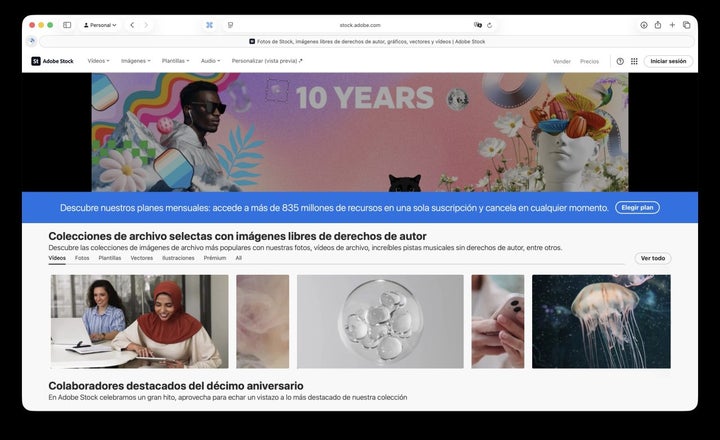
Adobe Stock is a creative asset service with over 835 million items, including HD and 4K videos, photos, illustrations, vectors, music, templates, and 3D assets we can use in commercial projects. It’s a reference platform when we need the exact shot for our B-roll, a smooth transition for an edit, or a cutaway that completes the script we’re working on.
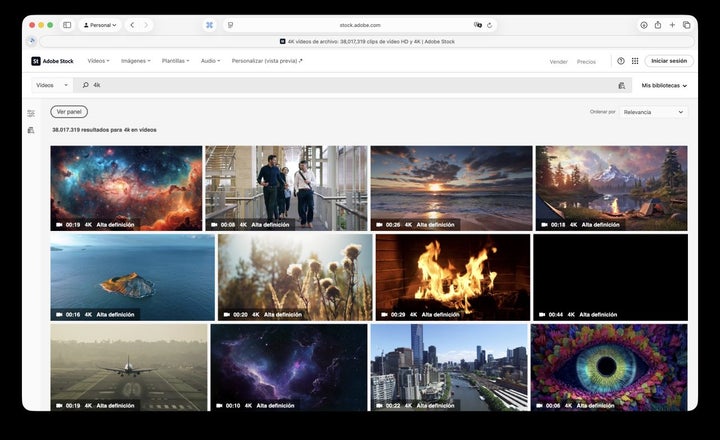
Within the platform —and focusing now on videos, the subject of this article— we find several categories that greatly speed up the search when we only have a general idea of what we’re looking for: 4K, loops, vertical, abstract backgrounds, green screen, countdowns, overlays, smoke, fire, or snow are just a few examples.
We also find curated collections and an “Editors’ Choice” section that highlights the latest resources with the strongest visual impact. This curation saves us hours of filtering and ensures aesthetic consistency throughout our timeline.
Adobe’s proposal focuses on commercial-use licenses with intellectual property indemnity of up to 10 000 USD, giving us the legal security we need when working on commercial campaigns. We can rely on the service guarantee and, very importantly, maintain full traceability of the materials we use.
Last but not least, the service’s Customize feature provides a layer of generative AI that allows us to quickly adjust color and framing or make slight variations even before downloading, ensuring the clip perfectly fits our project’s visual style.
Why We Should Use Adobe Stock
Too often, a full shoot isn’t viable, and here stock footage shortens production time, reduces costs, and, when used well, maintains quality standards. Instead of planning trips, requesting permits, and depending on the weather, we focus on a precise search for the material and, once found, download it directly into our timeline.
With stock content, we often have to adapt the narrative to the available material, instead of the material —as would happen if we filmed it ourselves— adapting to the narrative. Adobe’s already extensive catalog allows each concept and shot to have alternatives with different framings, durations, and speeds, giving us the flexibility to build rhythm and continuity while keeping visual variety within a single set of clips. If that is not enough, the service adds 500K new videos every month.
Beyond video, Adobe Stock also includes music, effects, and templates for After Effects and Premiere Pro, allowing us to support the edit in a much more complete way, within a single ecosystem and, most importantly, under a single license. But there’s more.
How It Integrates with Adobe Tools
The strongest advantage of Adobe Stock is, without a doubt, its integration with the rest of Adobe tools. Its native integration across Creative Cloud means we can search, preview, and license directly from Premiere Pro and After Effects in just a couple of clicks. That’s how easy it is to bring any clip, complete with metadata and references, straight into the project.
Photoshop, Illustrator, and InDesign also integrate with Adobe Stock and, although we’re focusing on its video capabilities here, it’s worth remembering that the same subscription covers images, vectors, and templates, which is key for creating thumbnails and graphics we can use in our production.
How to Use Adobe Stock Outside the Platform
Outside Creative Cloud, we can work with almost the same convenience, since we can download from the web in the formats that suit us and simply drag them into Final Cut Pro, DaVinci Resolve, CapCut, or virtually any editor. The service pays special attention to file naming, and its tagging system allows us to archive, version, and even share libraries with minimal extra management.
Adobe Stock Free Trial: Get Your First 4K Clip Free
For 30 days, Adobe Stock offers a free trial with 40 credits that let us download up to six full 4K clips. It’s an excellent way to test the platform while benefiting from its features from day one.
How do we get our first free 4K clip? Easy. We sign up for the trial, search for a 4K clip using the right filters, preview it, activate our license using the trial credits, and simply download the file.
Although it’s a trial, we get all the benefits of a standard license, so the free 4K clip is ready for commercial use and offers the same legal protection and indemnity as the paid subscription.
How to Make the Most of Adobe Stock for B-roll and Social Content
Now that we have content, let’s talk about how to make the most of it. For B-roll, it works well to choose a visual line —night city, macro nature, lifestyle— and download several variations on the same theme to maintain visual continuity while changing perspectives for smooth transitions.
On social platforms, vertical format is the standard, so clips we can filter as vertical and all loop collections are the ideal starting point for stories, Reels, and Shorts that require a professional finish. We can also add royalty-free music from the same subscription.
When we want to grab attention, lens flare overlays, grain, and glitch effects give a cinematic texture that stands out. Abstract backgrounds work perfectly for intros or outros, and we can enhance them with typography also available for download.
What Else Should We Know About Adobe Stock?
Finally, let’s address some key questions about Adobe Stock.
What exactly does an Adobe Stock subscription include?
With a subscription, we get access to standard high-resolution images, templates, 3D assets, standard music tracks, and HD video —plus rollover unused credits (max 480). Depending on the plan, we also enjoy extended licenses and access to premium content, all for commercial use.
What licenses are available and what are they for?
Downloads come with a standard commercial-use license for web, social, and apps, and when required, we can use the extended license for print materials and products intended for sale.
What is credit rollover and how does it work?
Some plans include credit rollover, which allows us to use unused credits later as long as our subscription remains active. The rollover limits depend on the chosen plan, but this lets us manage production peaks and avoid losing credits during slower periods.
What if we need more downloads in a specific month?
Besides the subscription, we can license additional assets as needed through credit packs, allowing us to keep our budget under control. If we need more we can upgrade to the new Unlimited plan witch have no credits, and no limits.
Can we use assets as a team?
Team plans allow all members to use and manage assets under centralized control. With proper permissions, Adobe Stock adapts easily to agencies and brands with multiple editors.
Adobe Stock Is Much More Than a Content Library
Adobe Stock, with a single subscription, offers us an extensive 4K content catalog, clear licensing, truly useful AI, and integration that lets us go from concept to production-ready timeline in just minutes.
When we want to streamline production without compromising quality, all we have to do is choose the right plan, download the first 4K clip with our free trial, and build our B-roll or social content knowing the material supports us every step of the way. A smooth workflow and, above all, one ready to grow with us.
Architect | Founder of hanaringo.com | Apple Technologies Trainer | Writer at Softonic and iDoo_tech, formerly at Applesfera
Latest from David Bernal Raspall
- The Web You Remember Is Waiting Here: Share Your Memory and Win a Trip to Switzerland
- Wonder 3D in Autodesk Flow Studio levels up the game: check out the AI that models anything in seconds
- The iPhone Fold has leaked: These could be Apple’s foldable specs
- OpenAI Launches ChatGPT Translate: Google Translate’s Competition?
You may also like
 News
NewsCrimson Desert updates by listening to the fans
Read more
 News
NewsThe existence of this Ubisoft game is a miracle, says its art director
Read more
 News
NewsThis Chinese gamer had his whole house catch fire, and despite the flames, his RTX 4060 survived
Read more
 News
News"We don't want more streaming," Gen Z wants to reclaim our most precious asset
Read more
 News
NewsTorrente Presidente will arrive on the world's largest streaming platform
Read more
 News
NewsThe United States and its allies dismantle the largest DDoS botnet in the world, responsible for the largest attack in history
Read more