
How To
How to Loop Video on VLC Media Player

- June 17, 2021
- Updated: July 2, 2025 at 4:03 AM
VLC Media Player has the ability to loop videos on various platforms. By looping videos, you can set multiple videos to play one after another in a continuous loop. Or you can just put a single video to play in a loop.
Although this is not a new feature, but rather one that has been around for a while, it is still a very useful function to have. Let’s look at how you can set your video to loop on VLC Media Player in Windows and Mac.
Create a Simple Loop
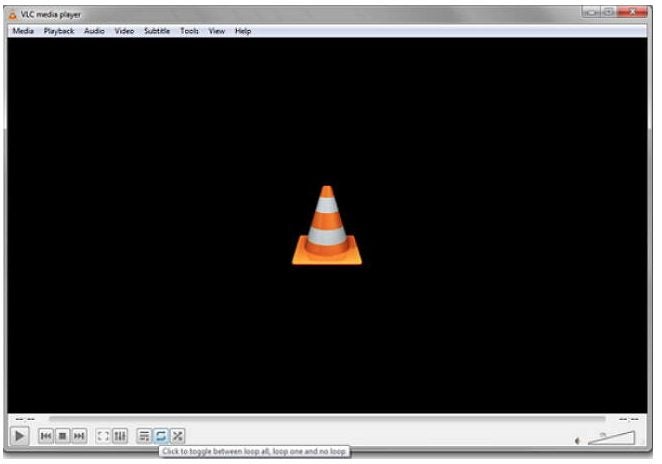
– Run VLC Media Player on your Windows or Mac computer.
– Open the video you want to loop. If you want to loop multiple videos, you have to add all the videos to the playlist.
– With your videos ready, you can now press the ‘Loop’ button at the bottom of the screen. The ‘Loop’ button is represented by the two arrows completing a loop.
- Tap the icon until you have the right setting between no loop, loop one or loop all. Your video or videos will continue to run in this loop until you stop the loop
Loop a Specific Section in a Video
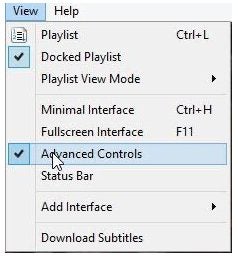
– Run VLC Media Player on your Windows or Mac computer and open the video.
– Click on ‘View.’
– Click on ‘Advanced Controls.
– Move the video to the starting point of the loop and click on the loop icon.
- Now move the video to the endpoint and click the loop button again. Now when you press play, it will only loop the selected section.
Loop Videos Easily With VLC Media Player
Sometimes, people loop videos just for a good laugh or to repeat sections to make the video stand out more. While not available on all video editors, we’re glad that VLC Video Player has this option.

How to Edit Video in VLC Media Player
MORE TIPSLatest from Shaun M Jooste
You may also like
 News
NewsGood news! Generation Z is increasingly going to the movie theaters… unlike the rest of the world
Read more
 News
NewsThe new Tekken champion is Japanese and is 92 years old
Read more
 News
NewsOne of the most successful movies of the year premieres on HBO Max
Read more
 News
NewsNaughty Dog is back at it: they are already crunching for their next game
Read more
 News
NewsPedro Almodovar returns with a new movie that is very Christmas-like
Read more
 News
NewsLarian Studios will hold an AMA to clarify their stance on AI early in the year
Read more