
How to remove objects from a photo on our iPhone
Goodbye to distractions

- November 1, 2024
- Updated: July 1, 2025 at 10:47 PM
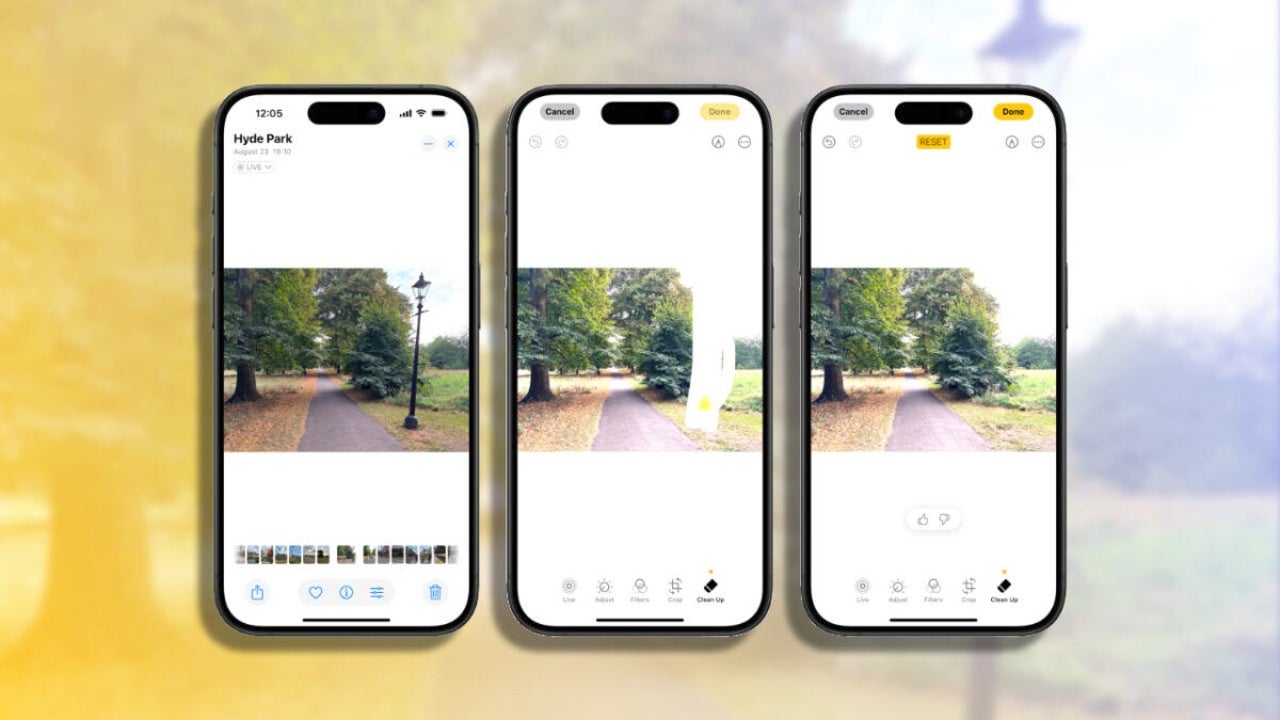
With the new Clean Up tool in iOS 18.1, photo editing from our iPhone is greatly simplified, as we can now easily remove unwanted elements from our images. A photo of a landscape with a power pole? A sign in the middle of a shot? They are a thing of the past. With Clean Up, we can eliminate these distractions in seconds, without the need for editing programs, all from the Photos app.

How to Use Clean Up in iOS 18.1
The Clean Up tool uses Apple Intelligence to analyze our photos and detect objects that might not be part of the ideal composition. From here, a simple tap on those objects makes them disappear.
And the best part is that we can do it directly from our iPhone, iPad, or Mac. How? By following these steps:
- We open the Photos app and select the image we want to enhance.
- We tap on the Edit button (the three horizontal bars).
- We select the Clean Up option (which may require a short download the first time).
- If Clean Up identifies an object we might want to remove, it highlights it with a special glow; we just need to tap it to remove it. If the system doesn’t suggest any selection, we can draw a circle around the object or paint over it to select it. As always, we can zoom in to adjust the selection if necessary.
- Once the object has disappeared, we tap on Done to save the changes.
The Clean Up tool is most effective for small objects and simple backgrounds, such as removing signs or some people from the background. The results, of course, will vary greatly depending on the content of the photo and the complexity of the background, but they are sure to surprise us.
Although removing the content of a photo disables its Live component, we are looking at a way to improve our shots significantly and easily. Similar to creating memories with just a description, it allows us to make any photo much better with just a tap.
Architect | Founder of hanaringo.com | Apple Technologies Trainer | Writer at Softonic and iDoo_tech, formerly at Applesfera
Latest from David Bernal Raspall
- The Software Behind the Success of Zootopia 2: How Autodesk Maya and Flow Production Tracking Brought It to Life
- The Web You Remember Is Waiting Here: Share Your Memory and Win a Trip to Switzerland
- Wonder 3D in Autodesk Flow Studio levels up the game: check out the AI that models anything in seconds
- The iPhone Fold has leaked: These could be Apple’s foldable specs
You may also like
 News
NewsThe villain from the Harry Potter movies has just embraced the new villain from the HBO Max series with this symbolic gesture
Read more
 News
NewsAn indie studio is reviving the multiplayer of The Last of Us 2 that PlayStation canceled
Read more
 News
NewsThe war in Ukraine claims a new victim: the release date of a promising new extraction shooter
Read more
 News
NewsGod of War introduces the actress who will play Freya in the Amazon series
Read more
 News
NewsThe creators of Yakuza reveal new details about their new franchise and yes: we will return to Kamurocho
Read more
 News
News"The story of Crimson Desert could be better," acknowledges its own CEO
Read more