
Article
Load Google Reader in the Firefox sidebar

- May 19, 2008
- Updated: July 2, 2025 at 9:31 AM
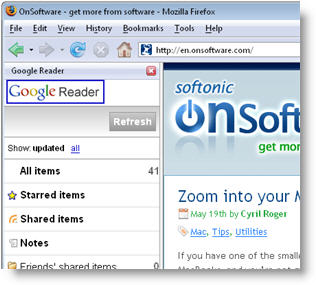 Google Reader has recently launched a revamped version of their iPhone interface in an attempt to make iPhone users’ experience in Reader much easier and far more comfortable. But what they probably didn’t think of is that this mobile-friendly version can also be loaded in the Firefox sidebar, just like we learned last week from the guys over at MozillaLinks.
If you want to add Google Reader to your Firefox sidebar, simply open the bookmark manager (Bookmarks > Organize bookmarks) and create a new bookmark with the Google Reader for iPhone URL. Make sure the “Load this bookmark in the sidebar” option is enabled and click on the OK button. There! Next time you load this bookmark it’ll open right in the Firefox sidebar, enabling you to always keep en eye on the latest headlines in your feeds.
Of course, you can also use this tip with other sites and make them open in the sidebar. This trick works better with websites that have been specifically designed for the iPhone or for any other mobile devices, as they’re usually simpler and their longer, less wide interface fits into the Firefox sidebar perfectly well.
You may also like
 News
NewsSecure Your Sleigh: How to Dodge Online Scams This Holiday Season
Read more
 News
NewsThe Studio Ghibli shorts that you will never be able to see (unless you pay a lot of money in Japan)
Read more
 News
NewsGmail Help Me Write with Gemini: 7 Ready-to-Use Prompts for Complaints, Sales & Internal Memos
Read more
 News
NewsZootopia 2 is the highest-grossing movie of 2025
Read more
 News
NewsAvatar: Fire and Ash is so expensive that it could very well dominate the box office and be an absolute failure
Read more
 News
NewsEditing Offline: What Photoshop’s On-Device AI Can Do
Read more