
How To
How to Clear Cache in Mozilla Firefox in 3 Steps

- June 8, 2021
- Updated: July 2, 2025 at 4:04 AM
If you’ve been using Firefox for a while, you might notice that it becomes slower with regular use. This can be attributed to the stored data that the browser saves in the background to use to recall popular sites that you’ve visited.
In order to return your browser speed, you will need to clear your site data and cache. Let’s look at how you can clear your cache.
Choose ‘Preferences’
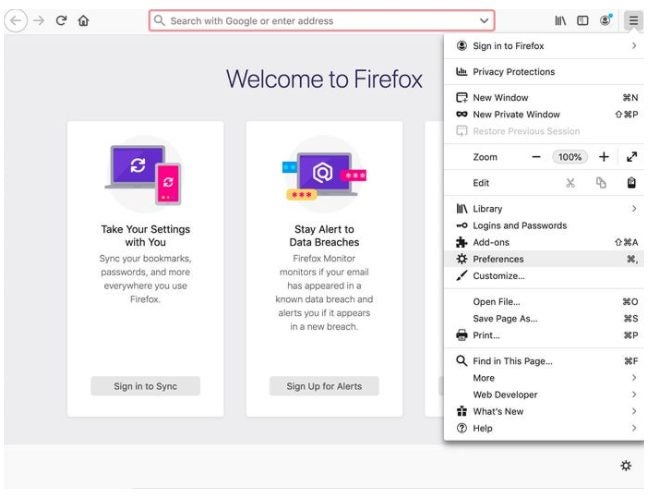
Open your Firefox browser on your computer. Click on the three horizontal lines (burger) in the top right of the screen. Now, click ‘Preferences’ in the drop-down list.
Clear Your Browsing Data
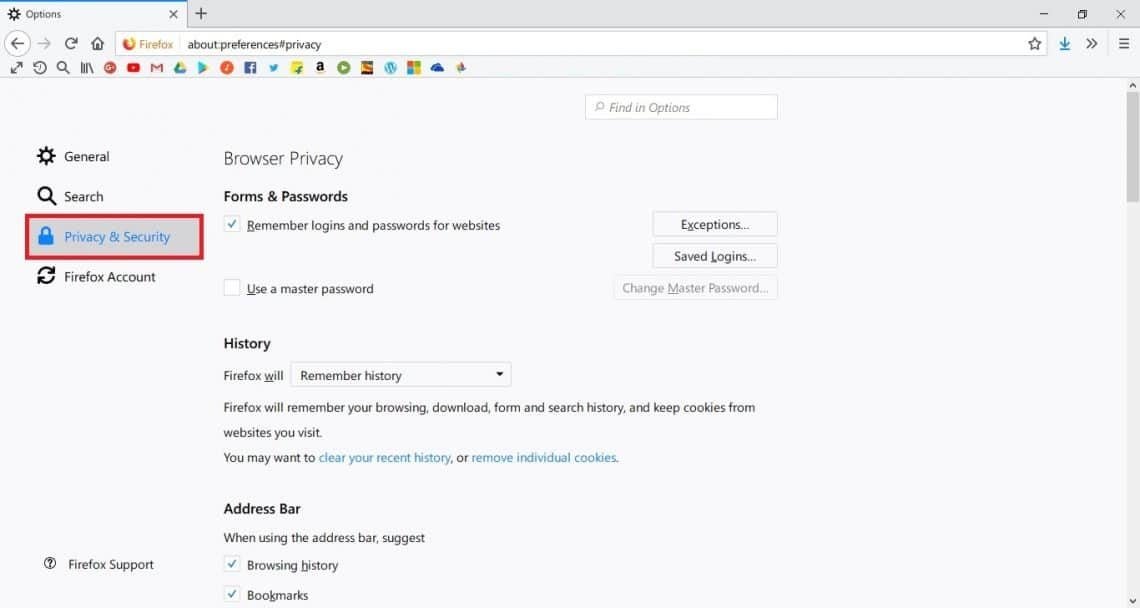
Choose the ‘Privacy and Security’ option from the list on the left-hand side of the screen.
Scroll through the list provided and click on ‘Cookies and Site Data’. When you’re done, click on ‘Clear Data’ to the right of the screen.
Choose to Clear the Caches Web Content
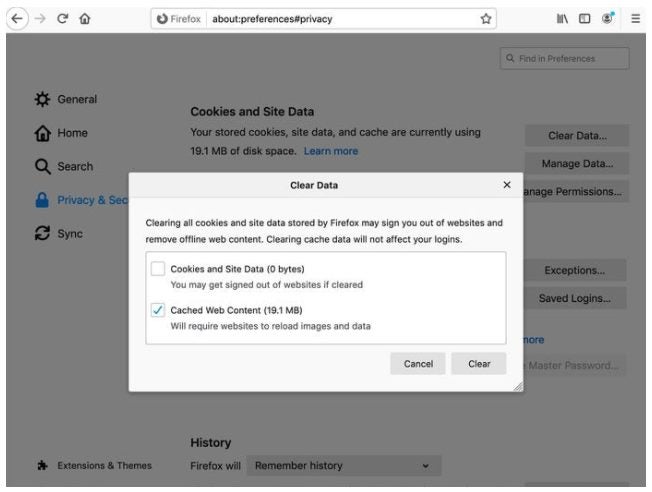
In the new pop-up window, select the option to clear ‘Cached web Content’. You can also choose to clear cookies and site data, but be aware that you may be signed out of all websites and will remove offline web content by selecting this option. When you’ve decided what data to clear, you can click on ‘Clear’ at the bottom of the window to finalize the process.
Clear You Cache and Return to Fast Browsing Speeds
By routinely clearing your cache, you can keep your browser functioning at its best and fastest speed. Why not try to clear your cache on your Firefox browser and see if you notice any difference.

How to Speed up Mozilla Firefox
MORE TIPSKeep up with Softonic
Get our latest tech news first, wherever you read.
Latest from Shaun M Jooste
You may also like
- News
Tech layoffs in 2026 update: 206,000 jobs cut worldwide
Read more
 News
Apple Intelligence clears China hurdle: iPad and Mac approved ahead of December rollout
Read more
 News
Grok now says Elon Musk replied to a Nazi account on X
Read more
 News
Samsung Galaxy S27 leaks: Pro and Ultra may dominate the lineup
Read more
 News
Elden Ring: Path of the Cardinal Sin ends with Melina art, not DLC
Read more
 News
Xbox Series X is still worth buying in 2026: 4K power, Game Pass value
Read more