
News
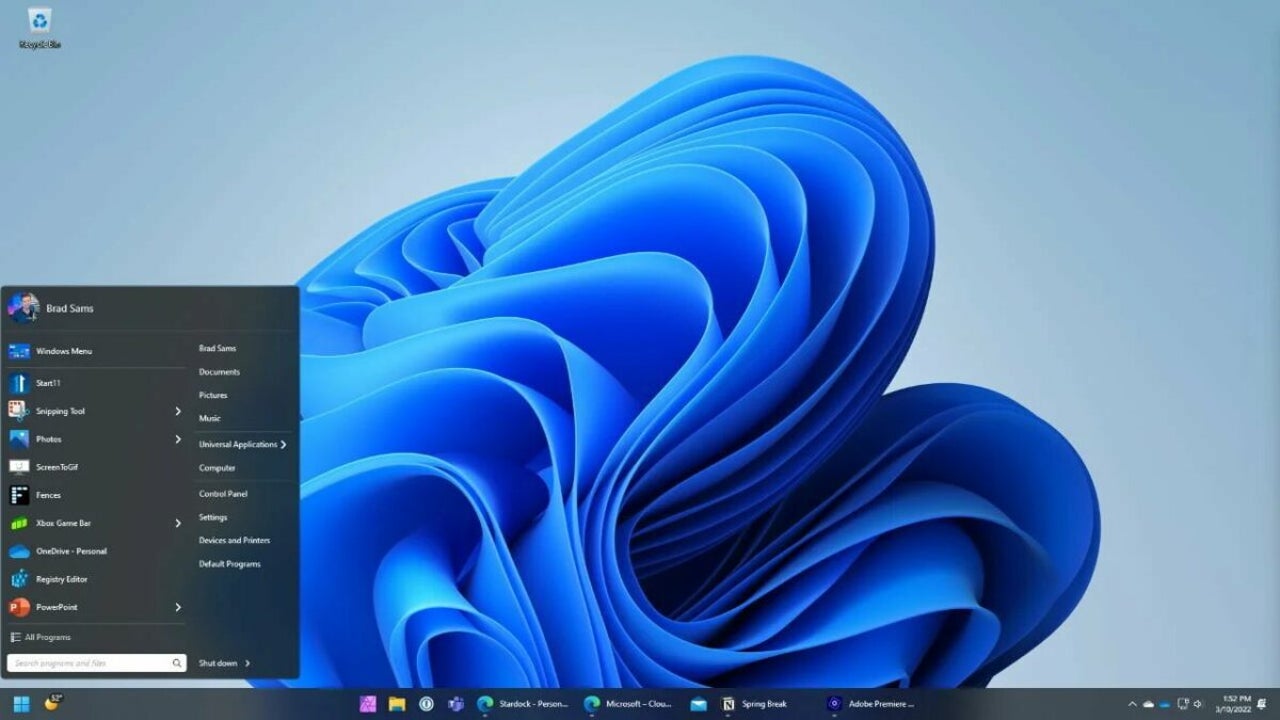
There’s an updated taskbar experience in Windows 11 Build 22581

- March 25, 2022
- Updated: July 2, 2025 at 3:52 AM
The release of Windows 11 changed a lot about the Microsoft ecosystem and how users interact with it. One of the biggest changes was the redesign of the home base of the Windows OS, the taskbar. Expanding on the improvements in aesthetics and functionality made to the taskbar in Windows 10, Windows 11 promised a fresh take on the clean Windows 10 design and a more utilitarian approach to what the taskbar could be.
After numerous minor updates, we seem to be getting closer and closer to the first full Feature Update to the Windows 11 OS, and if the Windows Insider preview channels are to be believed, there are a number of exciting changes still inbound to the humble taskbar. One change first implemented in the Windows 11 initial release is the central arrangement of the taskbar icons. Through each of the subsequent updates, this has remained a core feature of Windows 11, and going by the Windows 11 build 22581; this isn’t set to change when version 22H2 ‘Sun Valley 2’ goes public.
The latest insider build also improves how the feature update might look on Microsoft tablets. Instead of having the taskbar visible the entire time while in portrait mode, the taskbar will be hidden, with just the critical status icons visible. The user can then expand the taskbar by swiping upward at the bottom of the screen. Build 22581 also reintroduces the support of drag & drop in the taskbar environment as well as visual updates to the taskbar tray, bringing it further in line with the rest of the Windows 11 user experience. Microsoft says users will also be able to simplify their taskbar environment and hide icons, as well as hide the ‘show hidden icons’ button.
Along with minor taskbar feature updates, the latest insider build also addresses issues from other updates:
- The taskbar will now use the correct font, even in languages other than English.
- Drag & Drop within the taskbar environment now integrates with the auto-hide taskbar function.
- Messages on dragged items will now have rounded corners as per the new design language.
- The widget board no longer comes up accidentally when users interact with the taskbar.
It’s well within reason to expect the Sun Valley 2 Windows 11 taskbar experience to be even further optimized than the latest build and for the Windows 11 ecosystem, on the whole, to take its place as the most integrated, functional, and seamless Windows OS yet. With the critical update looming, why not refresh your knowledge of the latest Windows 11 features and fixes?
Latest from Russell Kidson
You may also like
 News
NewsStop Killing Games achieves its first major victory and now it remains to be seen what the European Union will do
Read more
 News
NewsSam Raimi claims that his next movie was going to be a psychological thriller, but that we will probably laugh while watching it
Read more
 News
NewsThe art director of Marathon believes that the game deserves a chance despite everything
Read more
 News
NewsValve's new online shooter will decide which characters to release first through community voting
Read more
 News
NewsThe Dragon Ball Super anime will return after months of hiatus
Read more
 News
NewsIf you've always dreamed of Spider-Man 4, Sam Raimi has bad news
Read more