Emulator Games for Windows: Play Classic Titles

Update: Sep 7, 2026 · 76 apps reviewed

Emulator games for Windows let you run console and handheld titles on a PC, often with sharper visuals, faster loading, and flexible controls. The best options balance accurate emulation with easy setup, stable performance, and support for save states, controller mapping, and graphical enhancements. Some tools focus on retro systems and lightweight play, while others are built for more demanding modern hardware or niche platforms. Choosing well depends on the games you want to run, how much tinkering you are comfortable with, and whether you care more about authenticity or convenience. Explore top picks for Windows.

Gerard Patrick Cadiang

Gerard Patrick Cadiang

Games & Software Writer

Gamer-turned-writer and 3D artist, Gerard covers software and video games with a blend of technical knowledge and creative flair. His passion for games since childhood now fuels his professional work.

Top programs about Emulator Games For Windows

  • Editor's choice
    4

    272 reviews

    Android gaming with deep control and multi-instance play

    • Google Play Store access for easy game installs
    • Keymapping for keyboard-and-mouse mobile controls
    • CPU, RAM, and resolution tuning for each setup
    • LDMultiplayer runs multiple synced instances at once

    Ideal for

    • PUBG MOBILE and MOBA players
    • Multi-account gaming workflows
    • Automation scripts for repeat tasks
    • Integration & Ecosystem

      8 / 10
    • Configuration & Control

      8 / 10
    • Compatibility Breadth

      6 / 10
    LDPlayer stands out for keyboard mapping, multi-instance play, and built-in automation, so it goes beyond basic Android emulation. The trade-off is hardware demand: LDPlayer 9 asks a lot from your PC, even though older versions cover weaker setups.

    Gerard Patrick Cadiang
  • Choose Softonic on Google and you'll see more of our articles in Top Stories, AI Overviews and AI Mode.

  • 5

    5 reviews

    Neo Geo ROM playback with low-spec-friendly setup

    • Runs classic Neo Geo ROMs from ZIP archives
    • Configures audio, video, controls, and ROM folders
    • Optimized to work well on low-spec devices
    • Loads arcade favorites like Metal Slug and Samurai Showdown

    Ideal for

    • Retro arcade fans
    • ZIP-based ROM libraries
    • Low-spec PCs
    • Configuration & Control

      7 / 10
    • Compatibility Breadth

      6 / 10
    • Integration & Ecosystem

      6 / 10
    NeoRAGEx keeps the focus on Neo Geo emulation, with a streamlined setup that covers audio, video, controls, and ROM folders without extra fuss. It does not include games, so the value here is strictly in a lightweight way to run your own classics on modest hardware.
    Gerard Patrick Cadiang
  • 3.6

    553 reviews

    Arcade hardware preservation with a deeper control layer

    • Emulates thousands of arcade hardware configurations
    • Adds a graphical interface for easier navigation
    • Lets you explore and run preserved arcade software
    • Offers broad customization for technical tinkering

    Ideal for

    • Arcade preservation projects
    • Technical emulation enthusiasts
    • Classic game archive exploration
    • Compatibility Breadth

      8 / 10
    • Configuration & Control

      7 / 10
    • Integration & Ecosystem

      5 / 10
    Neo MAME32 goes beyond casual game emulation and leans into preserving arcade hardware in software form. The free, GUI-driven package is compelling for archivists and hobbyists who want huge emulation breadth and plenty of customization, but it is less suited to people expecting a polished, game-first emulator.
    Gerard Patrick Cadiang
  • 3.6

    311 reviews

    Java mobile apps with strong device emulation

    • Loads JAR files and runs J2ME Java apps
    • Emulates many mobile phone models and APIs
    • Supports 2D and 3D graphics engines
    • Captures video and still images from sessions

    Ideal for

    • J2ME app testing on Windows
    • Mobile game compatibility checks
    • Keyboard or on-screen control mapping
    • Compatibility Breadth

      8 / 10
    • Configuration & Control

      6 / 10
    • Integration & Ecosystem

      5 / 10
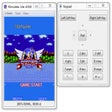
    KEmulator stands out for its broad J2ME compatibility and support for multiple phone models, which makes it useful for running older Java apps and games on Windows. The trade-off is a less accessible interface, but the performance, graphics options, and capture tools are strong enough to matter for serious testing and playback.
    Gerard Patrick Cadiang
  • 3.8

    22 reviews

    Play Mobile Games with Desktop Convenience

    • Supports a wide range of mobile games on PC
    • Customizable CPU and RAM settings for optimal performance
    • Integrated Google Play Store for easy downloads
    • Advanced sidebar tools for enhanced gameplay controls

    Ideal for

    • Gamers wanting a bigger display
    • Users needing high-performance emulation
    • Fans of Android apps on Windows
    • Integration & Ecosystem

      8 / 10
    • Configuration & Control

      7 / 10
    • Compatibility Breadth

      6 / 10
    XePlayer excels in delivering a robust mobile gaming experience on PC, but its high system demands may not suit all setups.
    Gerard Patrick Cadiang
  • 3.6

    757 reviews

    4K GameCube and Wii emulation with netplay

    • Runs GameCube and Wii titles on modern hardware
    • Up to 4K resolution with widescreen and texture upgrades
    • Built-in netplay for online multiplayer sessions
    • Quick saves, speed control, and frame rate patches

    Ideal for

    • PC gamers revisiting old console libraries
    • High-resolution retro display setups
    • Local co-op fans going online
    • Configuration & Control

      7 / 10
    • Compatibility Breadth

      5 / 10
    • Integration & Ecosystem

      5 / 10
    Dolphin Emulator stands out for stable GameCube and Wii emulation with 4K support, visual upgrades, and built-in netplay. The trade-off is familiar for emulators: some titles crash, others run unevenly, and you still need your own game dumps.
    Gerard Patrick Cadiang
  • 3.2

    2576 reviews

    Run Android Apps Smoothly on PC

    • Emulates Android 4.0 interface on desktop
    • Includes virtual SD card for file sharing
    • Supports multiplayer online gaming
    • Dynamic screen rotation and volume control

    Ideal for

    • Developers testing app functionality
    • Gamers playing mobile games on desktop
    • Users needing Android app access on PC
    • Configuration & Control

      6 / 10
    • Integration & Ecosystem

      6 / 10
    • Compatibility Breadth

      4 / 10
    While YouWave provides a functional Android emulation experience, its limited compatibility with newer Android versions and dated interface may not suit everyone. However, it's useful for those wanting basic app testing on older Android frameworks.
    Gerard Patrick Cadiang

Frequently asked questions (FAQs) about this topic

Can I play console games on Windows with emulators?

Yes, many emulators let Windows users run games made for older consoles, handhelds, and even some arcade systems. Performance depends on the emulator, your hardware, and the system being emulated. More demanding platforms usually need stronger CPUs and a compatible GPU.

Do emulator games on Windows need a controller?

Not always, but a controller usually gives a better experience for platformers, racers, and action games. Keyboard input works for many titles, especially strategy or puzzle games. Good emulators also let you remap buttons and configure analog sticks.

Are Windows emulators hard to set up?

Basic emulators are often simple to install, but setup can vary a lot by system. You may need to adjust graphics, audio, and input settings for the best results. Some platforms also require BIOS files or additional game files to run properly.

Why do some emulator games run slowly on PC?

Slow performance usually comes from high system requirements, inaccurate settings, or an underpowered CPU. Emulation can be more demanding than running native PC games because the software is translating one hardware environment into another. Lowering resolution or changing renderer options can help.
Signed in to Softonic as