Free Image Resizers for Windows and Batch Editing
Update: Sep 7, 2026 · 54 apps reviewed
Free image resizers for Windows help you shrink, enlarge, and reformat photos without opening a full editor. They are especially useful for preparing uploads, speeding up email attachments, creating web-friendly assets, and resizing whole folders in one pass. The best tools balance quality controls, batch processing, format support, and simple presets for common dimensions like social media, thumbnails, and documents. Look for options that preserve sharpness, handle drag-and-drop workflows, and avoid adding watermarks or unnecessary steps when you just need fast, clean resizing. Explore top picks for Windows.
Top programs about Image Resizer Free For Windows
- Editor's Choice4.1
68 reviews
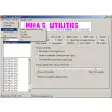
Explorer-side image conversion with instant previews
- One-click format conversion from Windows Explorer
- Extended thumbnail previews for fast image checks
- Supports 162 image formats and 224 extensions
- Custom output quality, preview size, and wallpaper set
Ideal for
- Windows Explorer workflow
- Large photo libraries
- Wallpaper setup from files
Output & Sharing
4 / 10Export flexibility, resolution, watermark-free saving, and social sharing.Editing Toolkit
3 / 10Range of adjustments, retouching, background tools, layers, and filters.AI & Automation
2 / 10Smart features that simplify editing: auto-enhance, object removal, style transfer.
SageThumbs keeps photo handling inside Windows Explorer, so it saves time when you need quick previews, format changes, or a fast wallpaper set. Its trade-off is clear: this is a lightweight utility with minimal editing depth, best suited to format conversion and basic image management rather than full photo retouching.
Martin Francis Hernandez - 3.2
10 reviews
Bulk HEIC conversion with quick preview and crop tools
- Convert HEIC files to BMP, JPEG, or PNG
- Batch-process multiple images in one go
- Preview photos before committing to export
- Crop or resize images before saving
Ideal for
- IPhone photo transfers
- Batch image conversion
- Quick crop and resize
Editing Toolkit
5 / 10Range of adjustments, retouching, background tools, layers, and filters.Output & Sharing
4 / 10Export flexibility, resolution, watermark-free saving, and social sharing.AI & Automation
2 / 10Smart features that simplify editing: auto-enhance, object removal, style transfer.
The tool keeps HEIC handling focused on the basics: fast conversion, batch processing, and a preview step that helps you avoid exporting the wrong file. It suits simple photo workflows, but the limited editing toolkit leaves serious retouching and layered adjustments to more capable editors.
Martin Francis Hernandez - 3.9
154 reviews
Batch photo resizing for fast cleanup jobs
- Batch resize large sets of photos in one pass
- Rename files while processing entire folders
- Convert image formats during batch operations
- Add watermarks and simple text overlays
Ideal for
- Event photographers sorting shoot folders
- JPEG and PNG export batches
- Watermarked proof sheets
Output & Sharing
6 / 10Export flexibility, resolution, watermark-free saving, and social sharing.Editing Toolkit
4 / 10Range of adjustments, retouching, background tools, layers, and filters.AI & Automation
2 / 10Smart features that simplify editing: auto-enhance, object removal, style transfer.
FastStone Photo Resizer focuses on the repetitive work that slows photo editing down: resizing, renaming, converting, and watermarking in bulk. It suits Windows users who need to prepare lots of images quickly, but it is not a full creative editor for detailed retouching or layered work.
Martin Francis Hernandez - 3.9
666 reviews
Embroidery file previews with accurate resizing
- Opens EMB, DST, EXP, PES, JEF, and HUS files
- Resizes designs while preserving stitch density
- Keeps thread colors accurate across colorways
- Exports designs as images and measures dimensions
Ideal for
- Embroidery shop file checks
- Windows-only production workflows
- Image exports for client previews
Output & Sharing
4 / 10Export flexibility, resolution, watermark-free saving, and social sharing.Editing Toolkit
3 / 10Range of adjustments, retouching, background tools, layers, and filters.AI & Automation
2 / 10Smart features that simplify editing: auto-enhance, object removal, style transfer.
The tool focuses on dependable embroidery viewing and conversion, with accurate resizing and color handling that matter when you need a quick pre-production check. I’d trust it for file inspection and basic export work, but the free and web versions stop short of real editing, and the desktop app is Windows-only.
Martin Francis Hernandez - 4
23 reviews
Fast Explorer-based resizing for no-fuss photo fixes
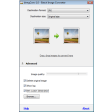
- Resize images directly from Windows Explorer
- Crop and resize in one lightweight tool
- Free GPL Windows utility for basic photo edits
- Built for quick optimization, not deep retouching
Ideal for
- Windows desktop file workflows
- Batch image prep for sharing
- Simple crop-and-resize jobs
Editing Toolkit
4 / 10Range of adjustments, retouching, background tools, layers, and filters.Output & Sharing
4 / 10Export flexibility, resolution, watermark-free saving, and social sharing.AI & Automation
2 / 10Smart features that simplify editing: auto-enhance, object removal, style transfer.
The tool’s strength is speed: it puts resizing right inside Windows Explorer, so routine photo prep stays out of the way. Its trade-off is obvious from the source material — few options — so I’d pick it for straightforward crop-and-resize tasks, not broader photo editing.
Martin Francis Hernandez - 4.2
465 reviews
Bulk image compression without wrecking quality
- Reduces image file size with minimal quality loss
- Processes multiple photos in one bulk batch
- Lets you pick the compression level before saving
- Shows a preview so you can check results first
Ideal for
- Website image optimization
- Batch compression for large libraries
- Windows photo workflow
Output & Sharing
7 / 10Export flexibility, resolution, watermark-free saving, and social sharing.Editing Toolkit
4 / 10Range of adjustments, retouching, background tools, layers, and filters.AI & Automation
3 / 10Smart features that simplify editing: auto-enhance, object removal, style transfer.
FILEminimizer Pictures focuses on one job and does it well: shrinking photo files without making them unusable. I value the bulk processing and preview tools most, since they make it practical for photographers and web publishers who need smaller images fast.
Martin Francis Hernandez