Editor's choice

4.5
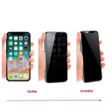
Are you looking for a privacy screen for your smartphone? Do you want to be able to hide your screen from prying eyes? Do…
Update: Sep 7, 2026 · 54 apps reviewed
Privacy screen tools help keep sensitive content visible only to the person sitting directly in front of the display. They are useful on laptops, phones and tablets when you work in public, share a desk or handle private messages, financial details or business files. Good options balance strong side-angle protection with minimal brightness loss, easy installation and compatibility with touchscreens or different display sizes. The best choices also avoid distracting color shifts and preserve enough clarity for everyday reading, browsing and remote work without making the screen feel dim or cramped.
Are you looking for a privacy screen for your smartphone? Do you want to be able to hide your screen from prying eyes? Do…
Choose Softonic on Google and you'll see more of our articles in Top Stories, AI Overviews and AI Mode.
Privacy Display - Shade is a utility tool designed for Android users seeking to protect their screen from prying eyes. It features six distinct…
Tilt Guard: Hide your Screen is a free Android utility that offers users enhanced privacy features by allowing them to control their display's visibility.…
Private Screen is an Android app developed by Latif Mohammad Khan that helps you protect your privacy. The app blurs your screen to prevent…
1 reviews
Privacy Filter Pro is a mobile app that allows users to protect their mobile screens from prying eyes while out in public. By putting…
10 reviews
Usability & Convenience
Feature Breadth
Security Architecture
ScreenBlur keeps sensitive details off the screen without forcing post-edit cleanup, and the local-only processing is the key privacy win. It’s a focused browser tool for live demos and recordings, though it solves screen-sharing privacy rather than broader password or encryption management.
Experience typing privacy with ShadeType: Privacy Screen by Polyhistor, to block onlookers when you type sensitive content in public. The app applies a translucent…
Privacy Display & Guard Screen is a free Android application designed to protect your personal information from prying eyes in public spaces. It offers…