Personalization (6011 programs)
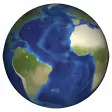
Pros: Witness the Earth roatating in real time. Educates you about city locations.
Cons: Heavy on CPU resources.
Pros: Authentic calligraphic strokes that mimic penmanship. Includes uppercase, lowercase, numerals, and basic punctuation. Distributed as TTF/OTF for broad application compatibility. Vector outlines maintain sharpness at different sizes.
Cons: Personal-use license excludes commercial projects. Advanced ligatures and alternates reserved for commercial release. Standard personal bundle lacks extended OpenType features.
Pros: Supports common video and GIF formats. Drag-and-drop interface is easy to use. Light system load for simple visuals. Basic controls for playback and layering.
Cons: Free version has watermark and video length cap. Struggles with 4K or complex layered media. No content library or advanced customization. Lacks performance optimization features.
Pros: Distressed 'Destroy' texture baked into glyphs, no manual distressing needed. Distributed as TrueType (.ttf), compatible with standard desktop tools. Small file size (around 41–82 KB), easy to store and transfer.
Cons: Limited glyph set restricts extended language support. License terms vary by repository; check the included text file.
Pros: Ornate uppercase and flowing lowercase for authentic script typography. Two weights (Regular, Medium) for basic typographic contrast. TrueType (.ttf) format ensures broad desktop and design software compatibility.
Cons: Character set limited to about 170–173 glyphs (Basic Latin, Latin-1 Supplement). Only two weights, limiting tonal range compared to larger families. No documented OpenType feature set or extensive stylistic alternates.