Audio Mixer Software for Clean, Balanced Sound

Update: Sep 7, 2026 · 87 apps reviewed

Audio mixer software sits at the centre of music production, podcast editing and live-style sound control. It lets you balance levels, pan tracks, add effects, route inputs and shape a mix so every voice or instrument sits in the right place. Good tools make multitrack work feel precise without getting in the way, while stronger options add automation, low-latency monitoring, plugin support and flexible routing for more complex sessions. The right choice depends on whether you need simple volume control, detailed studio mixing or a workflow built for recording, mastering and performance.

Martin Francis Hernandez

Martin Francis Hernandez

Games & Software Reviewer

Passionate gamer and content writer, Martin specializes in video game reviews and software coverage across commercial, business, and multimedia applications. He helps readers navigate the digital landscape with confidence.

Top programs about Audio Mixer

  • Editor's Choice
    4.8

    17 reviews

    Remote mixer control with pro effects and routing

    • Manage up to 18 input channels remotely
    • Adjust bus sends, routing, and processing
    • Switch between simplified and expert S/E views
    • Control four stereo effects powered by X32

    Ideal for

    • Live sound engineers on Android
    • Wireless control of X AIR mixers
    • X32 effects processing workflows
    • Editing Toolset

      7 / 10
    • Export & Workflow

      6 / 10
    • Recording Quality

      5 / 10
    The strongest part of X AIR is how it turns an Android device into a responsive remote surface for BEHRINGER’s X AIR mixers, with enough depth for channel control, routing, and X32-based effects. The trade-off is the learning curve on the expert tools, but experienced operators get serious flexibility for live or studio mixing.
    Martin Francis Hernandez
  • 3.7

    199 reviews

    Immersive Atmos playback for games, films, and headphones

    • Unlocks Dolby Atmos for three-dimensional spatial audio
    • Adds positional sound for supported games and movies
    • Works with major streaming services like Netflix and Disney+
    • Custom profiles let you tailor headphone virtualization

    Ideal for

    • Gamers chasing precise positional audio
    • Netflix and Disney+ home theater setups
    • Headphone listeners wanting Atmos trials
    • Recording Quality

      4 / 10
    • Export & Workflow

      4 / 10
    • Editing Toolset

      3 / 10
    Dolby Access stands out by turning standard playback into a more immersive Atmos experience, especially in games and streaming video where positional detail matters. The trade-off is clear: the headphone experience moves to a paid license after the trial, and the biggest gains come from Atmos-mastered content and better hardware.
    Martin Francis Hernandez
  • 4

    4 reviews

    Drag-and-Drop Simplicity for Audio Mixing

    • Supports MP3, WAV, and WMA formats
    • Drag-and-drop track arrangement
    • Basic effects like fade-ins and pitch adjustment
    • Direct audio recording via microphone

    Ideal for

    • Casual audio mixing projects
    • Quick edits without advanced tools
    • Basic podcast episode assembly
    • Editing Toolset

      5 / 10
    • Recording Quality

      5 / 10
    • Export & Workflow

      5 / 10
    The tool offers an intuitive drag-and-drop interface for users needing straightforward audio mixing without the complexity of advanced features. While its interface may feel outdated, it remains a practical choice for casual edits and basic projects.
    Martin Francis Hernandez
  • 3.6

    439 reviews

    Virtual mixing control for complex Windows audio setups

    • Routes microphones, browsers, music, and desktop audio
    • Five hardware inputs plus three virtual inputs
    • Intellipan EQ, compression, and noise gate controls
    • Works with VB-Audio Virtual Cable for extra routing

    Ideal for

    • Podcasters balancing live guest audio
    • Streamers managing game and chat feeds
    • YouTube creators routing browser sound
    • Recording Quality

      7 / 10
    • Editing Toolset

      7 / 10
    • Export & Workflow

      6 / 10
    Voicemeeter brings a professional virtual mixer layout to Windows, with plenty of routing power and handy monitoring tools once you learn the panels. The trade-off is a steep learning curve, but experienced podcasters, streamers, and video creators will get a lot from its free core and supplemental VB-Audio tools.
    Martin Francis Hernandez
  • 4.5

    113 reviews

    200% volume boost with bass-heavy EQ control

    • Raises device volume by up to 200%
    • Bass booster for fuller low-end playback
    • Custom equalizer tuning for audio balance
    • Works across headphones, phone, and speakers

    Ideal for

    • Android listeners with low speaker output
    • Headphone playback on the go
    • Bass-boosted music sessions
    • Editing Toolset

      3 / 10
    • Export & Workflow

      3 / 10
    • Recording Quality

      3 / 10
    The main draw here is simple volume amplification paired with bass and equalizer tuning, which makes it handy for quick listening fixes on Android. It does not offer the deeper editing, multitrack, or export workflow you’d expect from full audio production software, so I’d treat it as a playback enhancer rather than a studio tool.
    Martin Francis Hernandez
  • 5

    2 reviews

    Remote mixer control with deep live-show workflow tools

    • Customizable layers, layouts, and channel order
    • RTA overlay in PEQ/GEQ view for fast tuning
    • Gain reduction history, peak hold, and editable hold times
    • Routing matrix, mix copy, popgroups, and feedback detection

    Ideal for

    • Front-of-house engineers
    • Outdoor gigs in bright light
    • Behringer and A&H mixer rigs
    • Editing Toolset

      2 / 10
    • Export & Workflow

      2 / 10
    • Recording Quality

      2 / 10
    The strength here is remote control depth: the tool gives live engineers customizable views, meter history, and useful tuning aids like RTA overlay and feedback detection. It is not a DAW and never plays audio, so it belongs in mixer workflows rather than editing or production suites.
    Martin Francis Hernandez
  • 3

    4 reviews

    Root-level volume tuning for speaker and mic

    • Adjusts speaker volume through system mixer files
    • Tweaks microphone levels for louder recordings
    • Requires root access to change mixer_paths.xml
    • Results can vary by device and firmware setup

    Ideal for

    • Rooted Android audio tuning
    • Recording loud live events
    • Speaker too loud or too quiet
    • Recording Quality

      4 / 10
    • Editing Toolset

      3 / 10
    • Export & Workflow

      3 / 10
    The tool is focused on low-level Android audio tuning, letting rooted devices push speaker and microphone levels beyond the default limits. I would only trust it if you already understand root access and accept that mixer file differences can make the results inconsistent across phones.
    Martin Francis Hernandez
  • 3.3

    3703 reviews

    Advanced Mixing Tools for Live Performances

    • Supports multitrack mixing with video integration
    • Seamless iTunes library integration for easy access
    • High-quality audio output with perceptual gain control
    • Automated mixing features for effortless transitions

    Ideal for

    • Live DJs at events
    • Karaoke hosts needing video features
    • Producers mixing audio and video
    • Editing Toolset

      7 / 10
    • Export & Workflow

      6 / 10
    • Recording Quality

      5 / 10
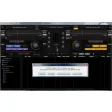
    The tool excels in delivering a robust mixing experience for both novice and experienced DJs. However, the 20-minute trial may limit in-depth exploration before commitment.
    Martin Francis Hernandez

Frequently asked questions (FAQs) about this topic

What does audio mixer software do?

Audio mixer software combines multiple tracks or inputs into a single output while letting you control volume, pan, effects and routing. It is used to shape how vocals, instruments and background audio sit together in a mix. Many tools also support automation and plugin processing.

Is an audio mixer the same as a DAW?

Not exactly. A DAW usually includes recording, editing, sequencing and mixing in one package, while a mixer focuses more on balancing and processing audio channels. Some DAWs include advanced mixer views that cover both needs.

What features matter in a good audio mixer?

Look for clear channel control, EQ, compression, effects routing and automation. Low latency is important if you are recording in real time. Support for plugins and multiple input/output paths also helps when sessions get more complex.

Can audio mixer software be used for podcasts?

Yes, it is a strong fit for podcasts because it helps balance voices, music beds and sound effects. A good mixer makes it easier to clean up inconsistent levels and keep speech clear. Features like noise control and automation are especially useful.

Do I need a physical mixer if I use software?

Not always. Software mixers can handle most home studio, podcast and editing workflows without extra hardware. A physical mixer is mainly useful if you want tactile controls or need to manage several live inputs at once.
Signed in to Softonic as