Night Camera Apps for Low-Light Photos and Video

Update: Sep 7, 2026 · 75 apps reviewed

Night camera apps are built to squeeze clearer photos and steadier video out of dim scenes. They usually combine longer exposure control, noise reduction, manual focus, and low-light enhancement to help you capture concerts, city lights, indoor events, and after-dark landscapes with less blur. The best options balance image brightness with natural detail, so shadows do not turn into muddy noise or overprocessed glow. When choosing one, look for manual controls, tripod support, RAW capture, and reliable performance on your device, because low-light shooting depends as much on software tuning as it does on camera hardware.

Jay Ricson Biñas

Jay Ricson Biñas

Content Writer & Review Editor

Content writer and review editor covering video games, mobile apps, and software. Jay delivers clear, engaging reviews focused on features, performance, and real usability to help readers make informed decisions.

Top programs about Night Camera

  • Editor's choice
    4.5

    6 reviews

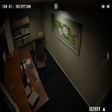
    Nightwatch anomaly spotting with report-based gameplay

    • Checks security cameras across house or hotel locations
    • Flags intruders and missing objects as anomalies
    • Lets you file reports with the correct type and location
    • Warns when anomalies pile up, with jumpscares in view

    Ideal for

    • Horror game fans
    • House and hotel scenarios
    • Jumpscare-heavy sessions
    • Speed & Reliability

      4 / 10
    • Capture Quality

      3 / 10
    • Camera Controls

      3 / 10
    The report mechanic and camera-hunting loop give this tool a clear horror-game hook, especially if you enjoy tracking small changes under pressure. It is too easy for players wanting a real challenge, though, and the scare factor does most of the heavy lifting.
    Jay Ricson Biñas
  • Keep up with Softonic

    Get our latest tech news first, wherever you read.

  • 5

    1 reviews

    Night capture with infrared-style viewing and recording

    • Dark-scene viewing with infrared camera effects
    • Capture photos in low-light environments
    • Record video clips from the camera view
    • Built-in compass helps orient scenes and direction

    Ideal for

    • Outdoor night explorers
    • Low-light photo snapshots
    • Video clips in darkness
    • Capture Quality

      6 / 10
    • Speed & Reliability

      6 / 10
    • Camera Controls

      6 / 10
    The app’s main draw is its night-vision-style camera view, which pairs low-light capture with photo and video recording plus a built-in compass. I’d treat it as a novelty utility for dark environments rather than a precision camera tool, since the source doesn’t point to manual controls or pro capture features.
    Jay Ricson Biñas
  • 4.9

    Manual night shooting with 10X zoom and exposure control

    • 10X zoom for tighter night-time framing
    • Exposure control to balance dim scenes
    • Adjustable contrast filters for darker shots
    • Black-and-white mode for dramatic captures

    Ideal for

    • Night photographers on Android
    • City lights and starry skies
    • Low-light photo and video capture
    • Camera Controls

      8 / 10
    • Capture Quality

      8 / 10
    • Speed & Reliability

      6 / 10
    The app’s strength is its manual night-shooting toolkit: 10X zoom, exposure control, and contrast tweaks give Android users more control in dim conditions. I’d still expect the best results from careful shooting rather than quick point-and-shoot captures, but it covers the low-light basics well.
    Jay Ricson Biñas
  • 4

    Low-light shooting with dual-camera capture modes

    • Front and back cameras can record at the same time
    • Auto modes for daylight, twilight, cloudy, and fluorescent
    • Adjust camera sensitivity and focus with auto flash
    • Apply color and thermal effects to photos and video

    Ideal for

    • Nighttime phone photographers
    • Mixed-light indoor scenes
    • Thermal-style photo effects
    • Camera Controls

      7 / 10
    • Capture Quality

      6 / 10
    • Speed & Reliability

      5 / 10
    The tool centers on low-light capture, with dual-camera recording and scene presets that help you adapt quickly to changing light. It’s useful for phone shooters who want more control over sensitivity and focus, though the feature set stays focused on capture rather than deeper pro camera controls.
    Jay Ricson Biñas
  • 4

    Low-light capture with manual sensitivity controls

    • High-sensitivity camera mode for moonlight and dusk shots
    • Manual sensitivity settings and 1-8x zoom control
    • Front and rear camera toggle with auto-timer selection
    • Thermal effects, color filters, and night-vision modes

    Ideal for

    • Night photographers
    • Still-object closeups
    • Thermal-style visuals
    • Camera Controls

      8 / 10
    • Capture Quality

      8 / 10
    • Speed & Reliability

      6 / 10
    The tool stands out for low-light capture, with sensitivity controls, zoom, and night-vision style effects that help when ordinary camera apps struggle after dark. It’s less about pro-grade manual exposure work and more about getting usable moonlight, dusk, and stylized shots quickly.
    Jay Ricson Biñas
  • 3.1

    5 reviews

    AI-Powered Photography for All Conditions

    • Capture professional-quality photos with AI Bokeh effect
    • Utilize manual controls like ISO and focus for precision
    • Enhance low-light images with advanced Night Mode
    • Quick access via lock-screen widget for convenience

    Ideal for

    • Creative photographers in any light
    • Social media influencers capturing dynamic shots
    • Casual users wanting better smartphone photos
    • Capture Quality

      9 / 10
    • Camera Controls

      8 / 10
    • Speed & Reliability

      8 / 10
    The app excels in low-light conditions, making it a must-have for photographers seeking versatility. Its AI features simplify complex photography techniques, appealing to both enthusiasts and casual shooters.
    Jay Ricson Biñas
  • 4

    Automated night-sky capture for complex telescope setups

    • Sequences exposures, filters, refocus, and guiding automatically
    • Controls cameras, mounts, filter wheels, and focusers together
    • Plate-solving frames celestial targets with precise alignment
    • Plugin support adds weather, remote control, and more

    Ideal for

    • Deep-sky imagers with multi-device rigs
    • Remote observatory workflows
    • Free open-source astronomy capture
    • Capture Quality

      8 / 10
    • Camera Controls

      8 / 10
    • Speed & Reliability

      6 / 10
    NINA stands out for advanced automation and broad hardware control, letting astrophotographers run long imaging sessions with far less manual intervention. The trade-off is a steep learning curve and no built-in editing, so it fits capture-focused workflows that already rely on other tools for processing.
    Jay Ricson Biñas
  • 4

    Night-time screen dimming with blue-light control

    • Lower screen brightness to reduce eye strain
    • Darken the display color to filter blue light
    • Set a custom brightness level for nighttime use
    • Use it to help wake up more easily

    Ideal for

    • Bedtime phone readers
    • Commuters in dark spaces
    • People sensitive to screen glare
    • Camera Controls

      2 / 10
    • Capture Quality

      2 / 10
    • Speed & Reliability

      2 / 10
    Night Owl focuses on one job: making an Android screen easier to tolerate in the dark. It’s a practical pick if brightness and blue light are what bother you most, though it doesn’t go beyond dimming and color adjustment.
    Jay Ricson Biñas

Frequently asked questions (FAQs) about this topic

Do night camera apps really improve low-light photos?

Yes, but the improvement depends on your phone's sensor and the app's processing. Good night camera apps use longer exposures, stacking, and noise reduction to brighten dark scenes while keeping more detail. They cannot fully replace strong hardware, but they can make a noticeable difference.

What features matter most in a night camera app?

Manual exposure control, stabilization, and noise reduction are the most useful features. A good app should also let you adjust focus and ISO, and ideally save in RAW for more editing flexibility. Tripod support is important if you want cleaner long-exposure shots.

Can night camera apps help with video in the dark?

Some can, especially if they offer exposure control and better low-light processing. Video is harder than still photography because shutter speed and motion blur become more noticeable. For the best results, look for apps that support stabilization and high-quality recording modes.

Why do night photos look noisy or blurry?

Dark scenes force the camera to use slower shutter speeds or higher ISO settings. That can introduce motion blur, grain, and soft detail if the phone moves or the subject is not still. A night camera app helps reduce these issues, but steady hands or a tripod still matter.
Signed in to Softonic as